> ## Documentation Index
> Fetch the complete documentation index at: https://docs.inflection.io/llms.txt
> Use this file to discover all available pages before exploring further.
# Personalized Email Asset
> One email asset, a unique version per contact — a default email plus per-contact versions pushed in over the API or MCP.
A **personalized email** sends a different version of the same email to each contact — full custom copy, not just merged tokens — while keeping one asset, one journey step, and your usual deliverability and reporting. It's built for AI-generated 1:1 outreach at scale.
Every personalized email holds two things:
* a **default email** — the fallback everyone gets, and
* a store of **per-contact versions** — pushed in over the API or MCP.
At send time, each contact gets their own version if one exists; everyone else gets the default. No blank sends.
**How it resolves:** for each contact at the **Send email** step → their version if it's ready, otherwise the default email. Evaluated per contact, when they reach the step.
## Create a Personalized Email
1. Go to **Emails** → **New Email**.
2. Choose **Per-Contact** as the editor type and give it a name.
3. Pick the **default email** — the fallback sent to anyone without a version. It must be an existing, sendable email (Visual or HTML).
4. Create. You land on the asset's **Versions** page.
 ## The Asset at a Glance
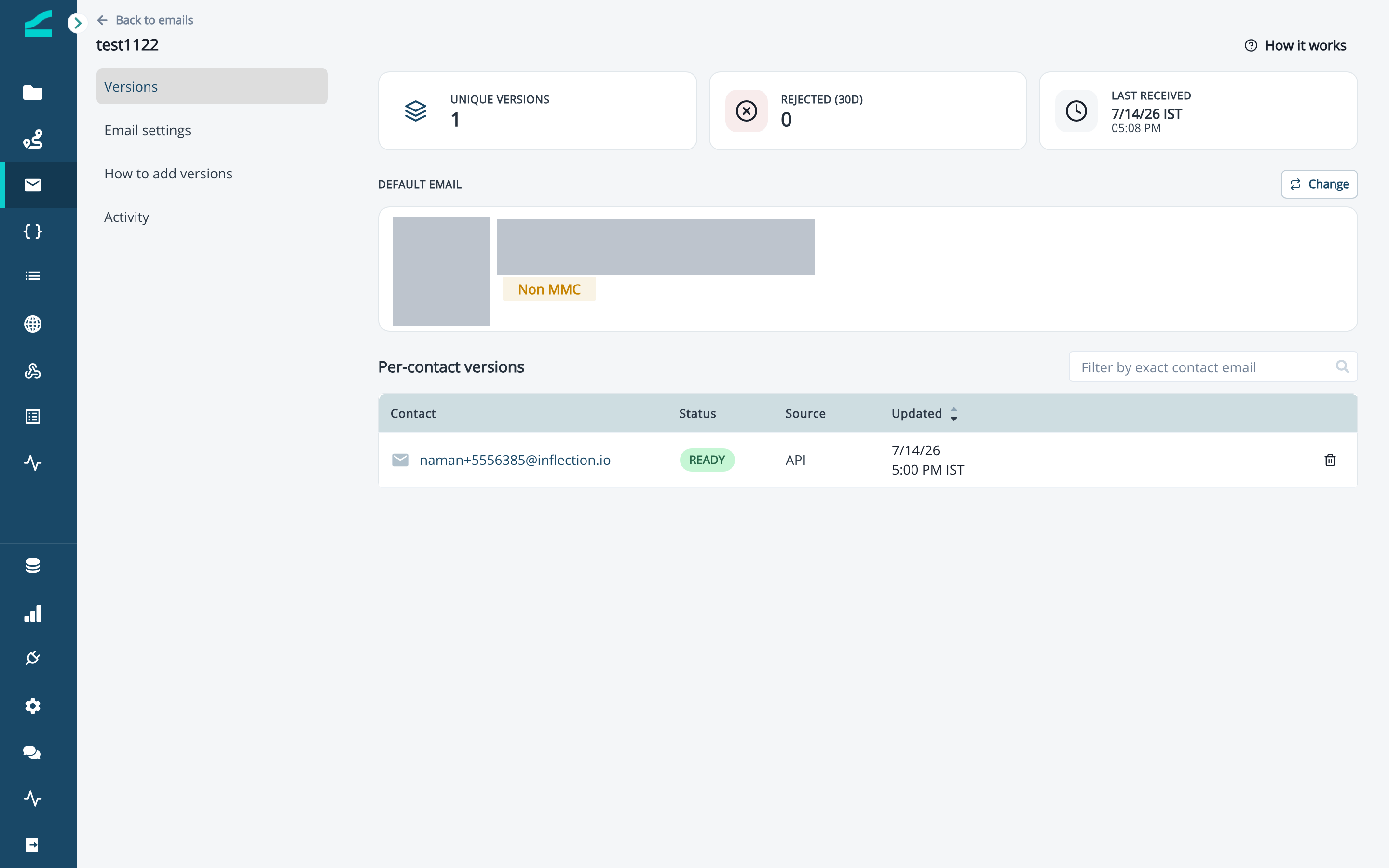
The **Versions** page is the home of a personalized email. It has three tabs — **Versions**, **How to add versions**, and **Activity**. The **Versions** tab shows:
* **Stats strip** — Unique versions, Rejected (30d), and Last received.
* **Default email** card — the fallback, with a thumbnail and a **Change** button.
* **Per-contact versions** table — one row per contact (Contact · Status · Source · Updated), searchable by exact contact email.
## The Asset at a Glance
The **Versions** page is the home of a personalized email. It has three tabs — **Versions**, **How to add versions**, and **Activity**. The **Versions** tab shows:
* **Stats strip** — Unique versions, Rejected (30d), and Last received.
* **Default email** card — the fallback, with a thumbnail and a **Change** button.
* **Per-contact versions** table — one row per contact (Contact · Status · Source · Updated), searchable by exact contact email.
 ## Set or Change the Default Email
The default email is **required** — a personalized email can't run without one. To change it, click **Change** on the Default email card, pick another sendable email, and it's saved. Only Visual or HTML emails can be the default (not other personalized or AI emails). The default email also supplies the sender configuration for the asset — from name, from address, and reply-to all come from the default.
## Add Per-Contact Versions
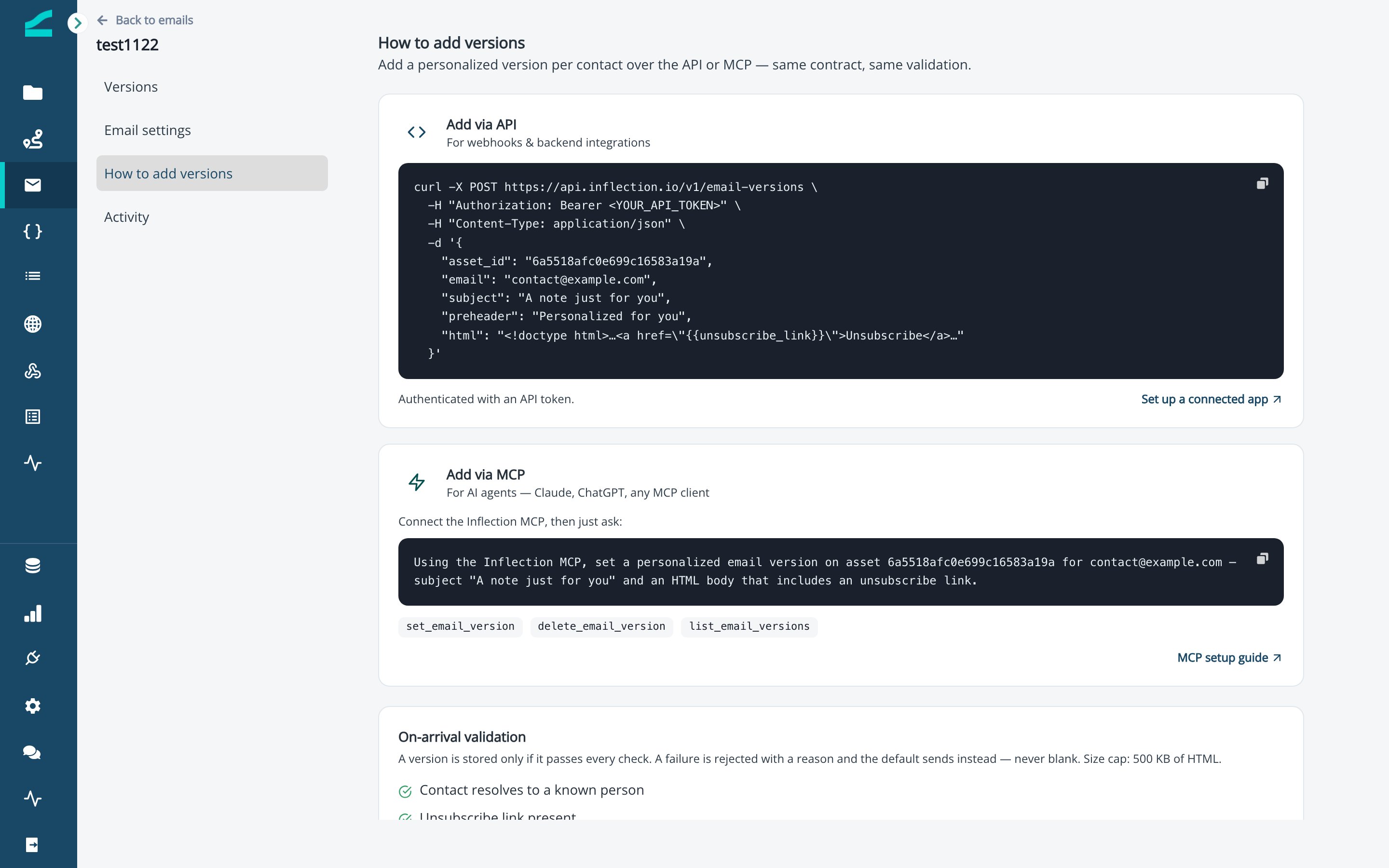
Versions are pushed in programmatically — never typed in the dashboard. Open the **How to add versions** tab for the exact endpoint and MCP tool for this asset.
* **API** — for webhooks and backend integrations. `POST` the asset's endpoint (shown on the **How to add versions** tab) with a `Bearer` access token and a JSON body of `{ assetId, email, subject, preheader, html }` — add an optional `expiresAt` to expire the version. The access token comes from a connected app.
* **MCP** — for AI agents in Claude, ChatGPT, or any MCP client. Connect the [Inflection MCP](/agents/inflection-mcp), then ask in plain language, for example: "Add a personalized version on this asset for [contact@example.com](mailto:contact@example.com) — subject 'A note just for you' and an HTML body that includes an unsubscribe link."
Each version is validated on arrival: the contact must resolve to a known person, the HTML must include the unsubscribe link, be well-formed, contain no other tokens, and stay within the 500 KB size limit. Anything that fails is marked **Rejected** (with a reason) and the default sends instead — never blank.
## Set or Change the Default Email
The default email is **required** — a personalized email can't run without one. To change it, click **Change** on the Default email card, pick another sendable email, and it's saved. Only Visual or HTML emails can be the default (not other personalized or AI emails). The default email also supplies the sender configuration for the asset — from name, from address, and reply-to all come from the default.
## Add Per-Contact Versions
Versions are pushed in programmatically — never typed in the dashboard. Open the **How to add versions** tab for the exact endpoint and MCP tool for this asset.
* **API** — for webhooks and backend integrations. `POST` the asset's endpoint (shown on the **How to add versions** tab) with a `Bearer` access token and a JSON body of `{ assetId, email, subject, preheader, html }` — add an optional `expiresAt` to expire the version. The access token comes from a connected app.
* **MCP** — for AI agents in Claude, ChatGPT, or any MCP client. Connect the [Inflection MCP](/agents/inflection-mcp), then ask in plain language, for example: "Add a personalized version on this asset for [contact@example.com](mailto:contact@example.com) — subject 'A note just for you' and an HTML body that includes an unsubscribe link."
Each version is validated on arrival: the contact must resolve to a known person, the HTML must include the unsubscribe link, be well-formed, contain no other tokens, and stay within the 500 KB size limit. Anything that fails is marked **Rejected** (with a reason) and the default sends instead — never blank.
 ## Review Coverage and Preview a Version
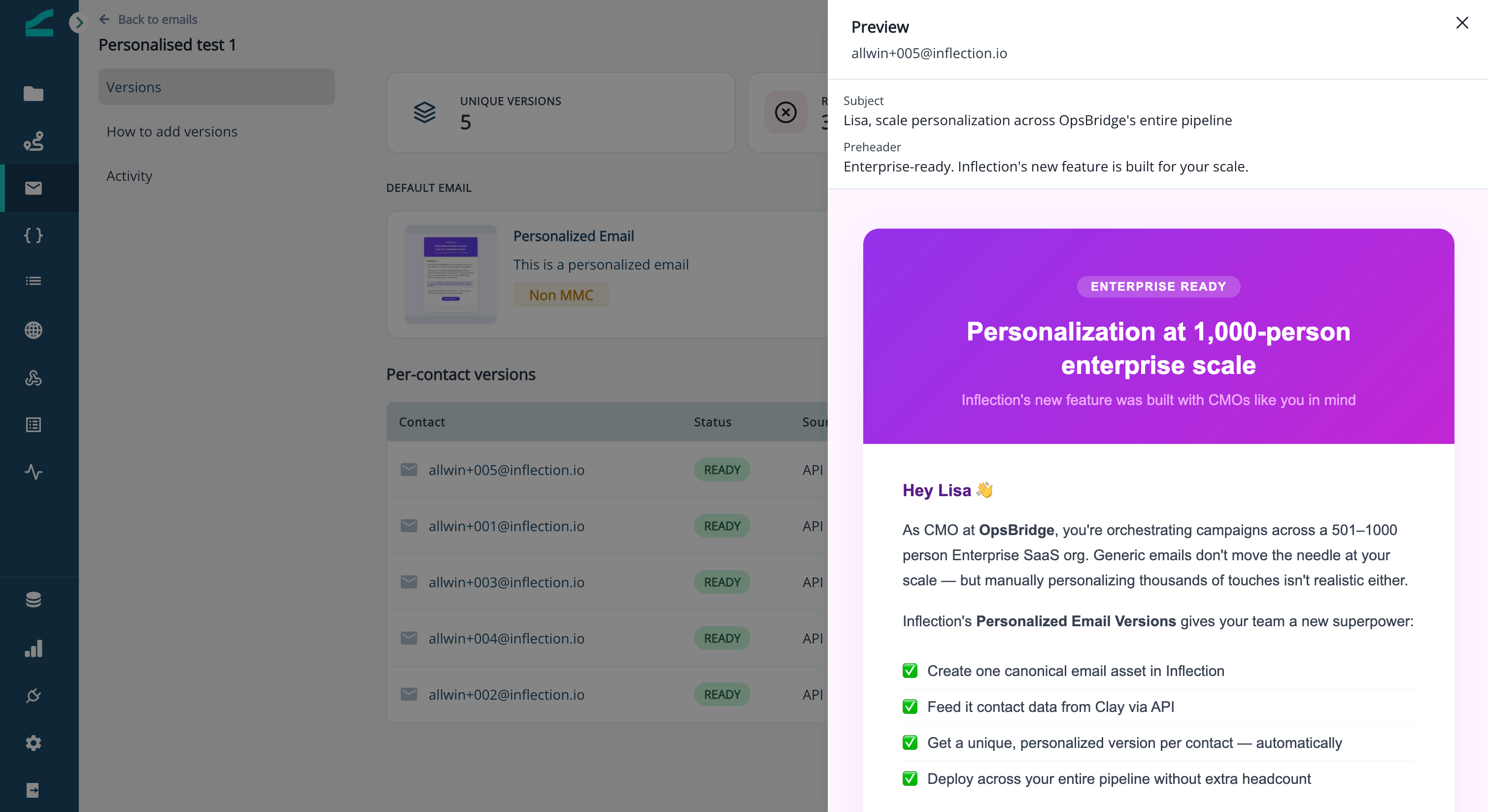
The stats strip tells you how many contacts have a version. To check exactly what a contact will receive, click their row in the versions table to open a live preview of their email.
## Review Coverage and Preview a Version
The stats strip tells you how many contacts have a version. To check exactly what a contact will receive, click their row in the versions table to open a live preview of their email.
 ## Track Changes in Activity
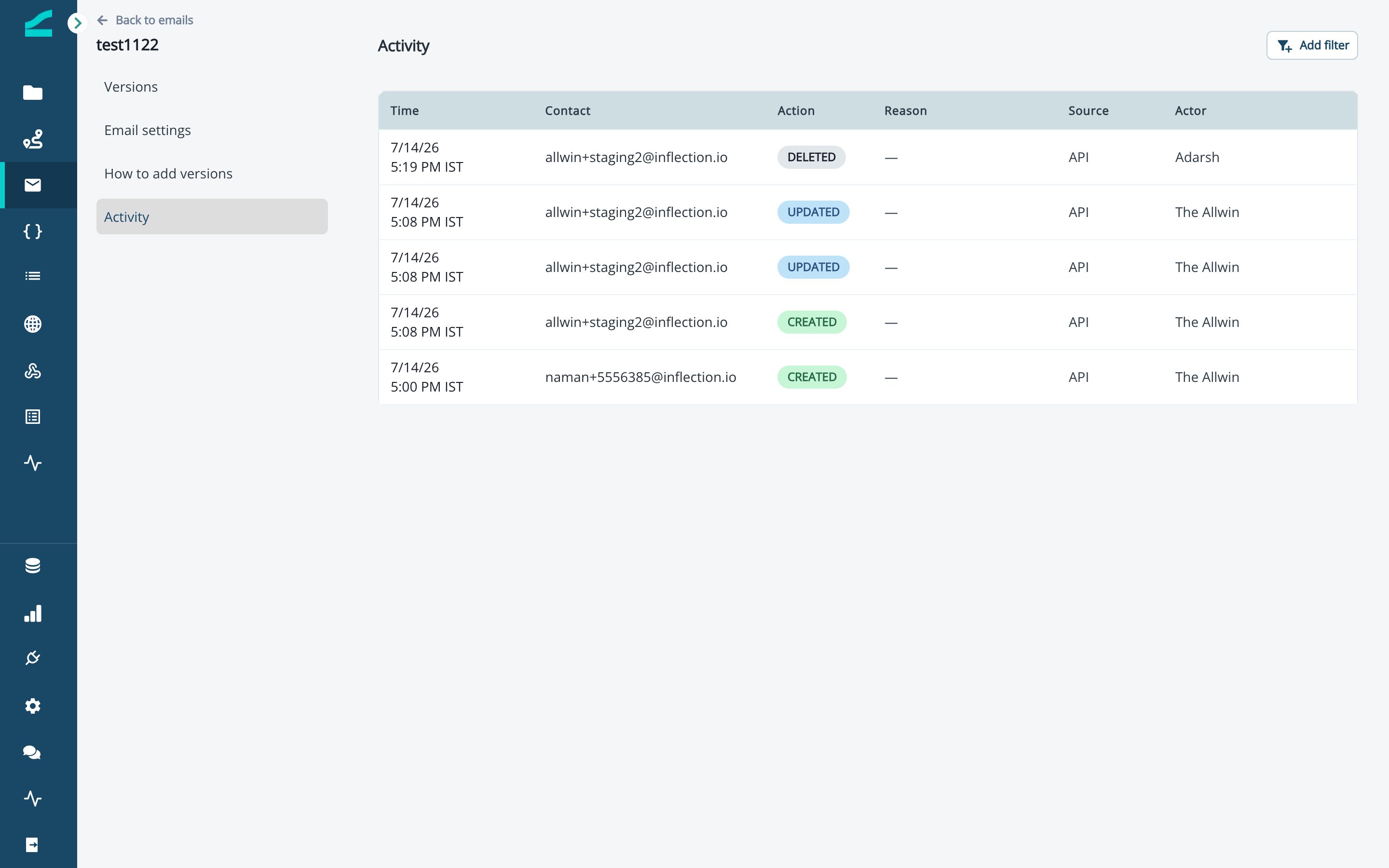
The **Activity** tab is the audit trail: every version **created**, **updated**, **deleted**, or **rejected** (with its reason), filterable by action and source.
## Track Changes in Activity
The **Activity** tab is the audit trail: every version **created**, **updated**, **deleted**, or **rejected** (with its reason), filterable by action and source.
 ## Send It in a Journey
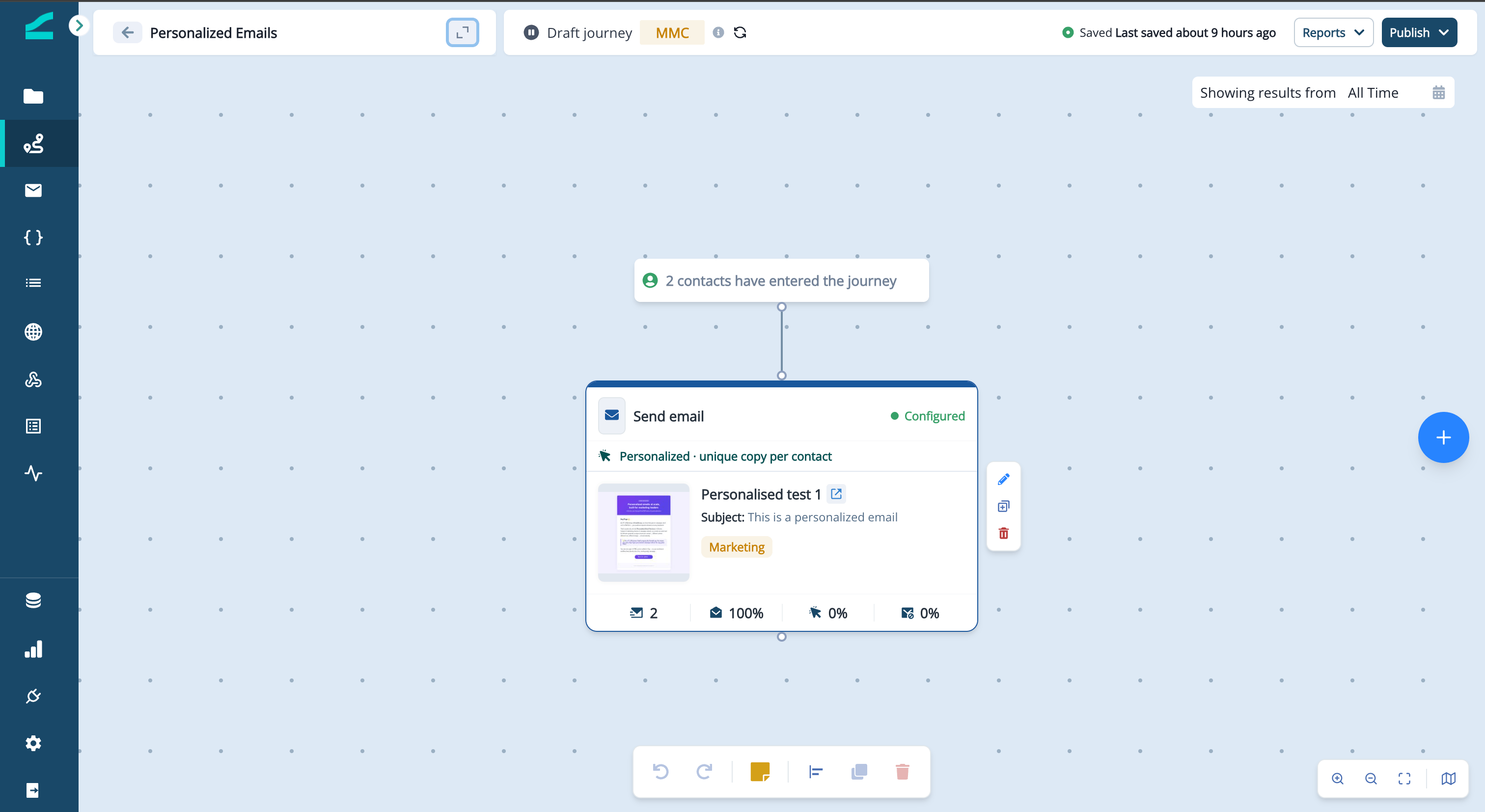
Add a **Send email** step and pick the personalized email. The step shows a **Personalized · falls back to default** pill so you know it resolves per contact. When a contact reaches the step, they get their version if it's ready, otherwise the default.
## Send It in a Journey
Add a **Send email** step and pick the personalized email. The step shows a **Personalized · falls back to default** pill so you know it resolves per contact. When a contact reaches the step, they get their version if it's ready, otherwise the default.
 ## See a Contact's Personalized Versions
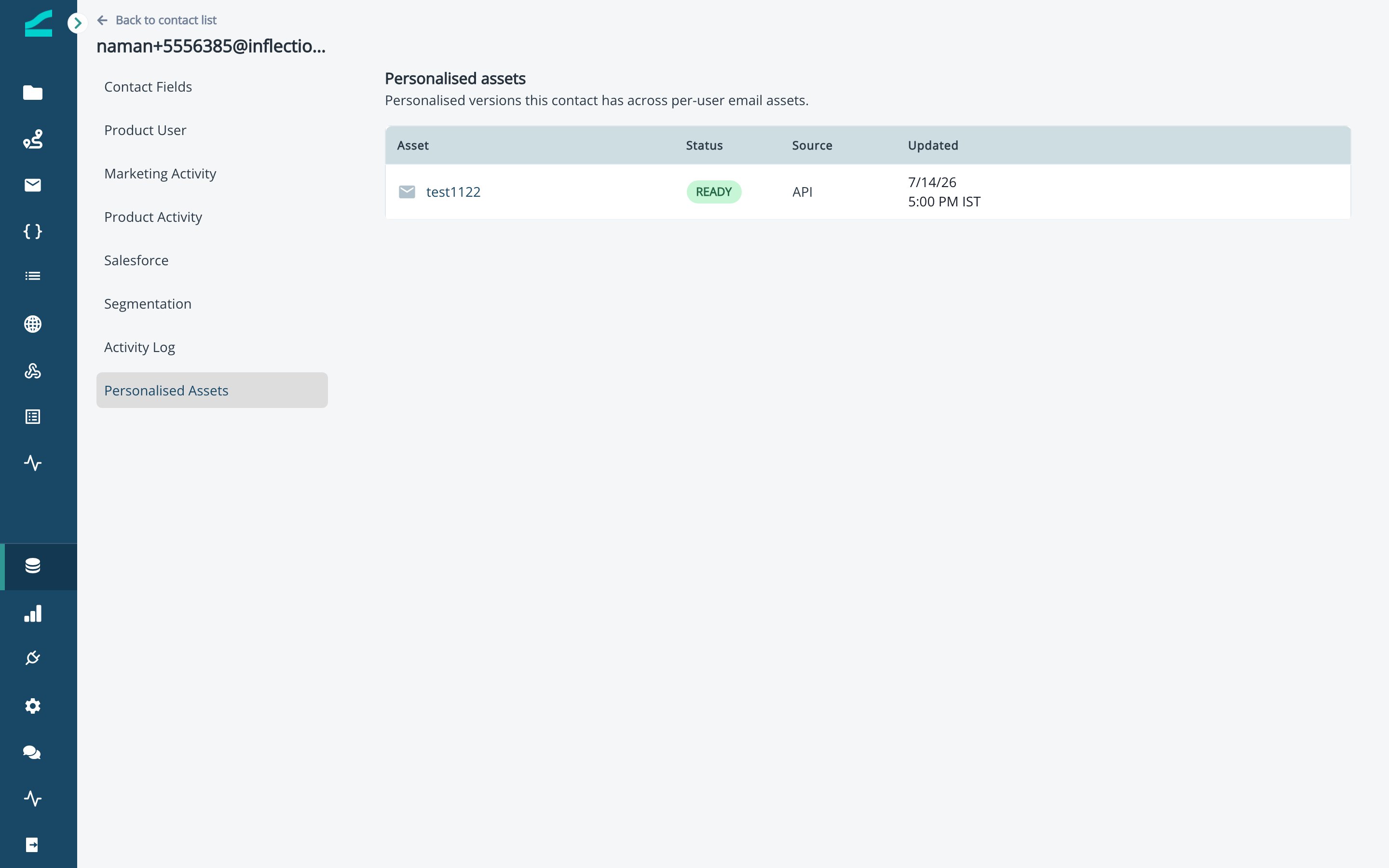
On any contact's detail page, the **Personalised assets** tab lists every personalized email that contact has a version for — with its status, source, and last updated.
## See a Contact's Personalized Versions
On any contact's detail page, the **Personalised assets** tab lists every personalized email that contact has a version for — with its status, source, and last updated.
 **In short:** one asset = a default email + a per-contact version store. Push versions over API/MCP, review coverage, and send in a journey — each contact gets their version, everyone else gets the default.
## Good to Know
* **One asset, one journey step** — resolution happens per contact at send time, so reporting and deliverability work exactly like a normal email.
* **The default is mandatory** — the asset can't run without a sendable default.
* **Versions are programmatic** — pushed over API or MCP, never typed in the dashboard.
## Additional Resources
* [Send Personalized Emails from Clay](/agents/send-personalized-emails-from-clay) — push per-contact versions from a Clay table
* [Integrate with Claude](/agents/integrate-with-claude) — add versions by chatting with an AI agent
* [Inflection MCP](/agents/inflection-mcp) — the complete tool reference
**In short:** one asset = a default email + a per-contact version store. Push versions over API/MCP, review coverage, and send in a journey — each contact gets their version, everyone else gets the default.
## Good to Know
* **One asset, one journey step** — resolution happens per contact at send time, so reporting and deliverability work exactly like a normal email.
* **The default is mandatory** — the asset can't run without a sendable default.
* **Versions are programmatic** — pushed over API or MCP, never typed in the dashboard.
## Additional Resources
* [Send Personalized Emails from Clay](/agents/send-personalized-emails-from-clay) — push per-contact versions from a Clay table
* [Integrate with Claude](/agents/integrate-with-claude) — add versions by chatting with an AI agent
* [Inflection MCP](/agents/inflection-mcp) — the complete tool reference