> ## Documentation Index
> Fetch the complete documentation index at: https://docs.inflection.io/llms.txt
> Use this file to discover all available pages before exploring further.
# Send Personalized Emails from Clay
> Push a unique, per-contact email from a Clay table into an Inflection Personalized Email Asset with Clay's HTTP API column.
With Clay's **HTTP API** column, you can push a unique, per-contact email straight into an Inflection **Personalized Email Asset** — so each contact receives their own version of one email, sent from one journey step. This connects Clay's per-row personalization to Inflection's sending, deliverability, and reporting.
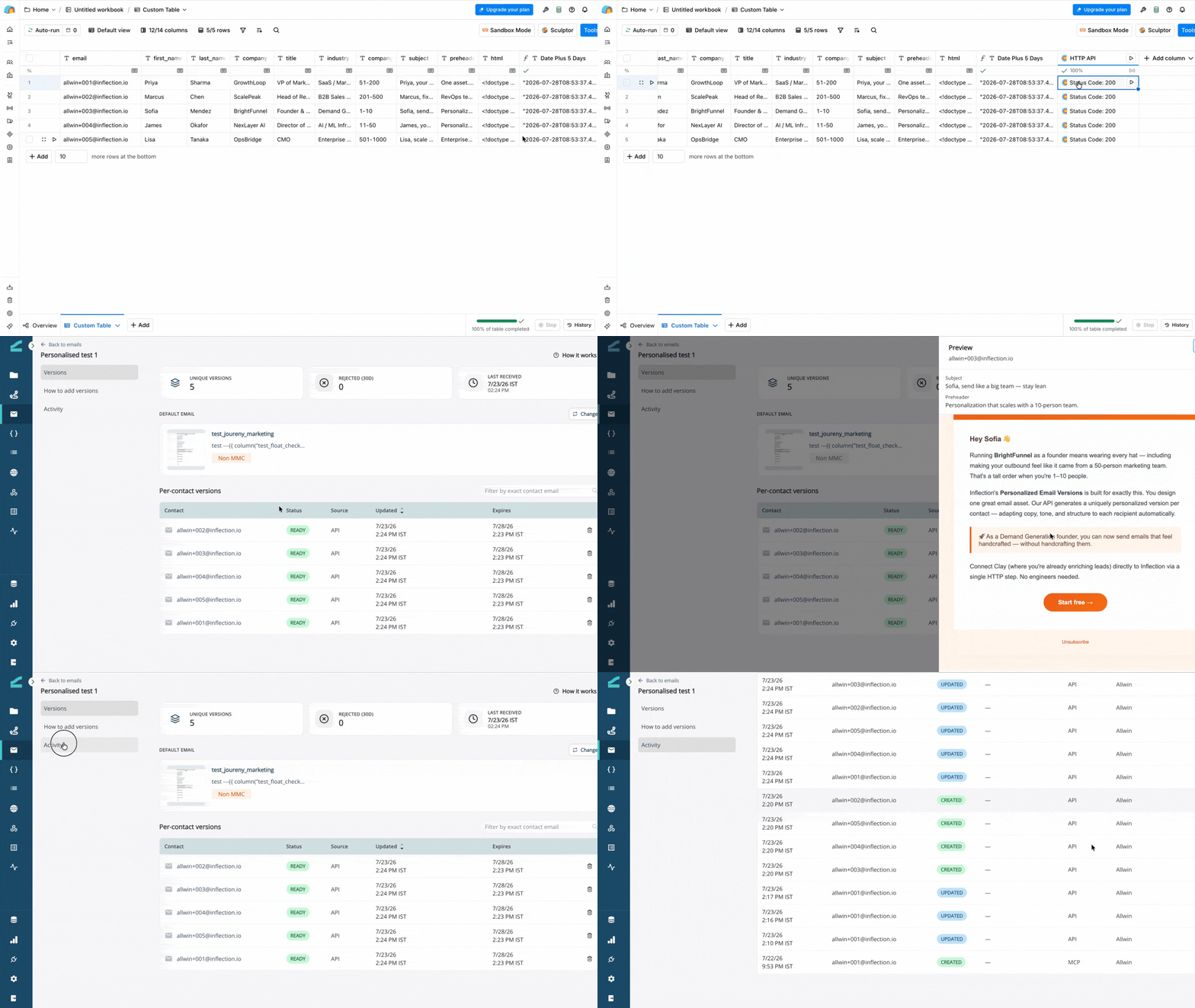 This guide assumes you already have a Personalized Email Asset in Inflection. To create one, see [Personalized Email Asset](/agents/personalized-email).
The flow: a Clay table (contact data and one HTML column per row) → an **HTTP API** column → Inflection's Email Versions API. Each contact who has a version gets it at send time; everyone else gets the asset's default email.
## Prerequisites
Before you begin, confirm you have:
* A Clay account with access to the **HTTP API** integration column.
* An Inflection account, and a **Personalized Email Asset** already created. Copy its asset ID from the asset URL (`…/assets/email/per-user//versions`) or the **How to add versions** tab.
* An Inflection API token — a **Personal Access Token (PAT)** from a connected app, or an OAuth access token. Both work as bearer tokens.
* Test contacts that **already exist** in your Inflection tenant. The API rejects versions for unknown contacts.
## Get Your Inflection Token
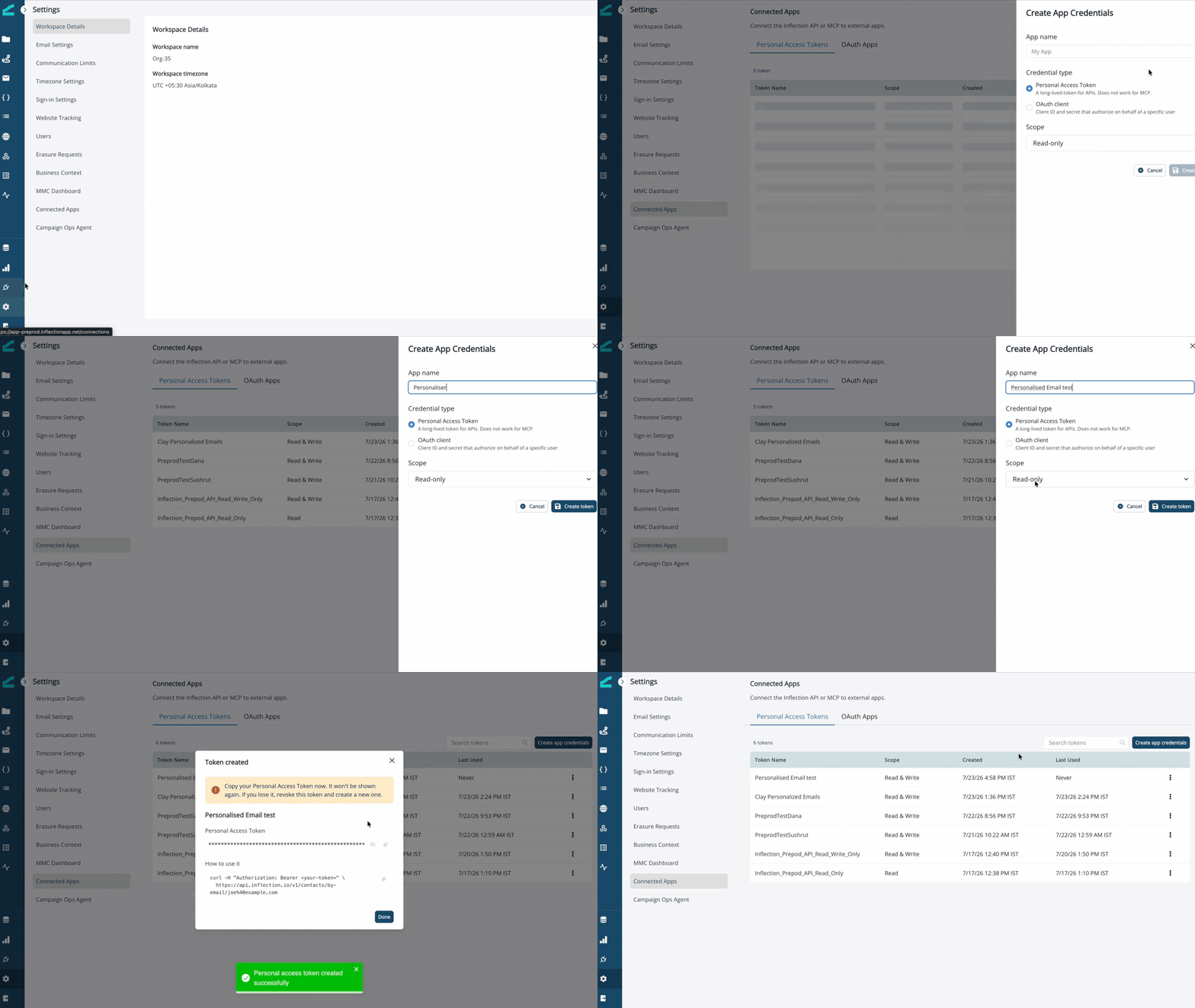
Create a PAT under **Settings** → **Connected Apps** — the step-by-step is in [Get Your Personal Access Token](/api-reference/get-your-pat). Copy the token and store it securely — you won't be able to see it again.
This guide assumes you already have a Personalized Email Asset in Inflection. To create one, see [Personalized Email Asset](/agents/personalized-email).
The flow: a Clay table (contact data and one HTML column per row) → an **HTTP API** column → Inflection's Email Versions API. Each contact who has a version gets it at send time; everyone else gets the asset's default email.
## Prerequisites
Before you begin, confirm you have:
* A Clay account with access to the **HTTP API** integration column.
* An Inflection account, and a **Personalized Email Asset** already created. Copy its asset ID from the asset URL (`…/assets/email/per-user//versions`) or the **How to add versions** tab.
* An Inflection API token — a **Personal Access Token (PAT)** from a connected app, or an OAuth access token. Both work as bearer tokens.
* Test contacts that **already exist** in your Inflection tenant. The API rejects versions for unknown contacts.
## Get Your Inflection Token
Create a PAT under **Settings** → **Connected Apps** — the step-by-step is in [Get Your Personal Access Token](/api-reference/get-your-pat). Copy the token and store it securely — you won't be able to see it again.
 ## Prepare Your Clay Table
Your table needs one column for each field you'll send:
| **Column** | **Description** |
| ----------- | ----------------------------------------------------------------------- |
| `Email` | The contact's email address. Must match an existing Inflection contact. |
| `Subject` | The personalized subject line. |
| `Preheader` | The inbox preview text. |
| `Html` | The full HTML of the personalized email. |
Use enrichment or an AI column (drawing on fields like first name, company, or title) to generate the `Html` column before the HTTP step.
**The unsubscribe rule.** Every version's HTML must contain the literal token `{{unsubscribe_url}}`, and Inflection rejects any other `{{…}}` token. Clay's own merge and formula fields also use `{{ }}`, so when you build the `Html` column, make sure `{{unsubscribe_url}}` survives as literal text — for example, wrap it as `{% raw %}{{unsubscribe_url}}{% endraw %}` in a formula. Referenced into the request body as `/Html`, the literal passes through unchanged.
## Configure the HTTP API Column
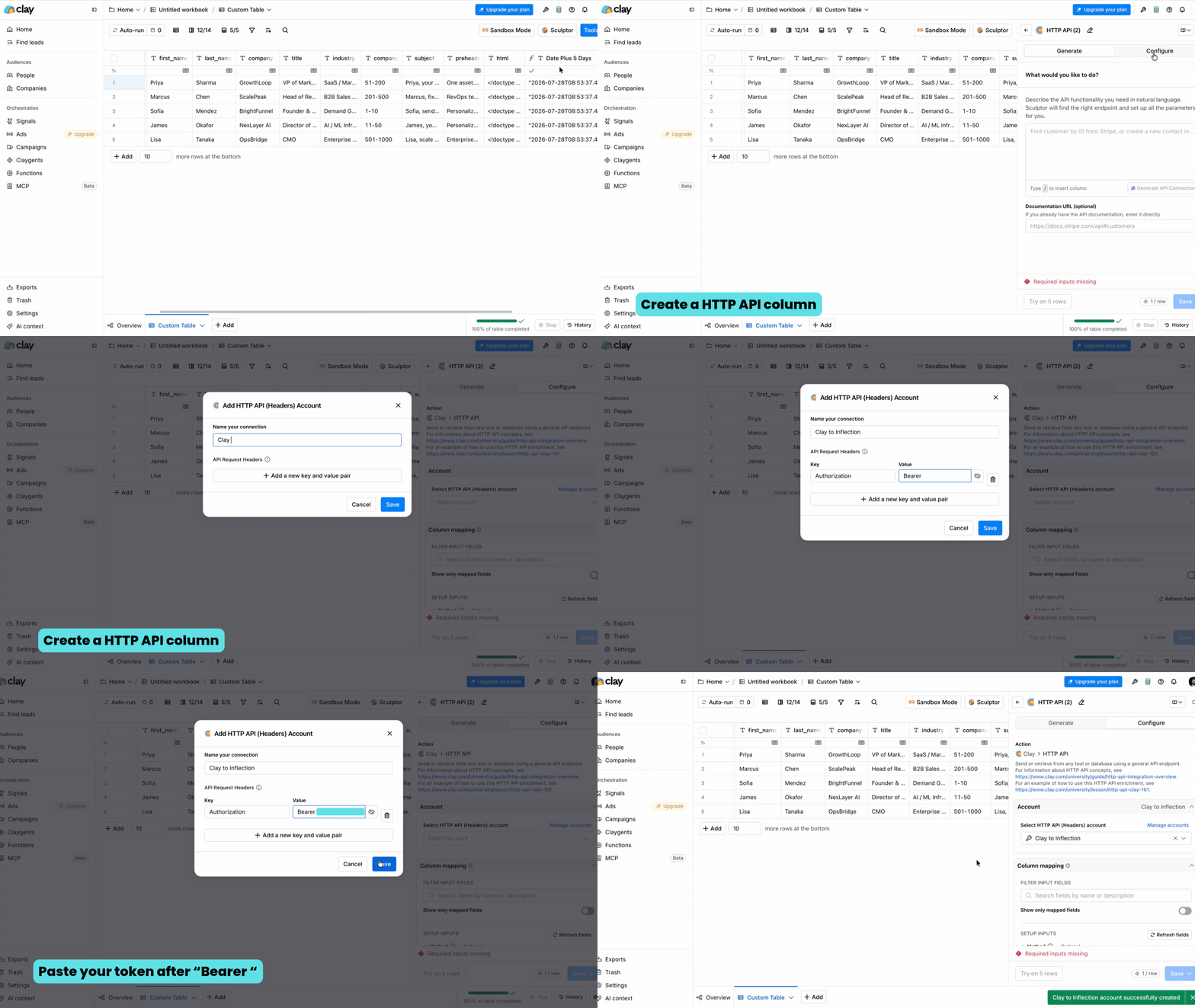
Click **+** to add a column, search for **HTTP API**, and select it. The column's setup has a few sections — fill each one exactly as below.
### 1. Account (Authentication)
The **Account** holds your Inflection token so it never sits in the table. Create it once and reuse it.
1. Click **Select account** → **+ Add account**.
2. Under **API Request Headers**, add one row:
* **Key:** `Authorization`
* **Value:** `Bearer ` — paste only the token after `Bearer`, with no quotes, no `<` or `>` or extra spaces.
3. Give the account a name (for example, `Inflection PAT`), save it, and select it.
Keep the token in the Account, not in the column's own Headers — the Account keeps it out of the table and lets you reuse it across columns.
## Prepare Your Clay Table
Your table needs one column for each field you'll send:
| **Column** | **Description** |
| ----------- | ----------------------------------------------------------------------- |
| `Email` | The contact's email address. Must match an existing Inflection contact. |
| `Subject` | The personalized subject line. |
| `Preheader` | The inbox preview text. |
| `Html` | The full HTML of the personalized email. |
Use enrichment or an AI column (drawing on fields like first name, company, or title) to generate the `Html` column before the HTTP step.
**The unsubscribe rule.** Every version's HTML must contain the literal token `{{unsubscribe_url}}`, and Inflection rejects any other `{{…}}` token. Clay's own merge and formula fields also use `{{ }}`, so when you build the `Html` column, make sure `{{unsubscribe_url}}` survives as literal text — for example, wrap it as `{% raw %}{{unsubscribe_url}}{% endraw %}` in a formula. Referenced into the request body as `/Html`, the literal passes through unchanged.
## Configure the HTTP API Column
Click **+** to add a column, search for **HTTP API**, and select it. The column's setup has a few sections — fill each one exactly as below.
### 1. Account (Authentication)
The **Account** holds your Inflection token so it never sits in the table. Create it once and reuse it.
1. Click **Select account** → **+ Add account**.
2. Under **API Request Headers**, add one row:
* **Key:** `Authorization`
* **Value:** `Bearer ` — paste only the token after `Bearer`, with no quotes, no `<` or `>` or extra spaces.
3. Give the account a name (for example, `Inflection PAT`), save it, and select it.
Keep the token in the Account, not in the column's own Headers — the Account keeps it out of the table and lets you reuse it across columns.
 ### 2. Column Mapping
Fill the request fields:
* **Method:** `POST`
* **Endpoint:** `https://api.inflection.io/v1/email-versions`
* **Body:** choose **JSON** and paste the following. Each `/Column` maps to that column's value for the row:
```json theme={null}
{
"assetId": "YOUR_ASSET_ID",
"email": "/Email",
"subject": "/Subject",
"preheader": "/Preheader",
"html": "/Html"
}
```
### 2. Column Mapping
Fill the request fields:
* **Method:** `POST`
* **Endpoint:** `https://api.inflection.io/v1/email-versions`
* **Body:** choose **JSON** and paste the following. Each `/Column` maps to that column's value for the row:
```json theme={null}
{
"assetId": "YOUR_ASSET_ID",
"email": "/Email",
"subject": "/Subject",
"preheader": "/Preheader",
"html": "/Html"
}
```
.gif?s=9553767f8814ac6a467cfcc3dfae22d7) * **Headers:** add one key/value row —
* **Key:** `Content-Type`
* **Value:** `application/json`
* **Headers:** add one key/value row —
* **Key:** `Content-Type`
* **Value:** `application/json`
-1.gif?s=d4bddd759f35075947c8329ffc121630) Wrap string references in quotes (`"email": "/Email"`); leave numeric or date references unquoted. To expire a version automatically, add an `expiresAt` field (ISO-8601): either a literal `"expiresAt": "2030-01-01T00:00:00Z"`, or map it to a Clay date column such as a "Date + 5 days" formula (unquoted). Omit the field entirely for a version that never expires.
### 3. Retry on Failure
Leave **Retry on failure** off. A rejected version (for example, a missing unsubscribe link) is a data issue to fix in the row, not something a retry resolves — keeping it off makes failures visible.
### 4. Run Settings
* **Auto-run:** off — so the column runs only when you click **Run**. This lets you test one row before pushing the whole table.
* **Custom rate limit:** optional. Set one if you're pushing a large table and want to pace the requests.
## Test, Then Run
1. Click **Run** on a single row.
2. Confirm a `200` response. A stored version returns `{ "data": { "status": "stored" }, "meta": { "status": "SUCCESS" } }`.
3. In Inflection, open the asset's **Versions** tab and confirm the contact now shows a version.
4. Run the column across the full table.
## Optional: Create Contacts First
The Email Versions API rejects versions for contacts that don't exist yet. If your Clay rows include new people, add an upstream **HTTP API** column that seeds them before the versions step — same Account, with:
* **Method:** `POST`
* **Endpoint:** `https://api.inflection.io/v1/contacts`
* **Body:** `{ "email": "/Email" }`
Contact creation is asynchronous — allow a few seconds before the versions step runs.
## Troubleshooting
**401 Unauthorized**
* Confirm the Account header is exactly `Authorization: Bearer ` with no duplicated `Bearer`, quotes, or whitespace — a malformed value is the most common cause.
* Confirm the **Endpoint** is `/v1/email-versions`, not a `/dash/...` path.
* Confirm the token's environment matches the host (preprod token → preprod host).
**400 Bad Request**
* Check the JSON — string values need quotes.
* Confirm `assetId` is a valid, existing Personalized Email Asset.
**Version rejected**
* **Contact not found** — the contact doesn't exist in the tenant yet. Seed it first.
* **Missing unsubscribe link** — the `Html` is missing the literal `{{unsubscribe_url}}` token.
* **Disallowed token** — the `Html` contains a `{{…}}` token other than `{{unsubscribe_url}}` (often a Clay merge field that leaked through).
* **Over size limit** — the `Html` is larger than 500 KB. Keep it lean and use hosted image URLs instead of inline base64.
## Good to Know
* **One version per contact, per asset.** Re-sending updates that contact's version.
* **The default always covers the rest.** Contacts without a version get the asset's default email — never a blank send.
* **Clay runs row by row.** Large tables take time depending on your Clay rate limits.
## Additional Resources
* [Personalized Email Asset](/agents/personalized-email) — how the asset, versions, and default work
* [Inflection MCP](/agents/inflection-mcp) — push versions from an AI agent instead of Clay
* [Clay HTTP API documentation](https://university.clay.com/docs/http-api-integration-overview)
Wrap string references in quotes (`"email": "/Email"`); leave numeric or date references unquoted. To expire a version automatically, add an `expiresAt` field (ISO-8601): either a literal `"expiresAt": "2030-01-01T00:00:00Z"`, or map it to a Clay date column such as a "Date + 5 days" formula (unquoted). Omit the field entirely for a version that never expires.
### 3. Retry on Failure
Leave **Retry on failure** off. A rejected version (for example, a missing unsubscribe link) is a data issue to fix in the row, not something a retry resolves — keeping it off makes failures visible.
### 4. Run Settings
* **Auto-run:** off — so the column runs only when you click **Run**. This lets you test one row before pushing the whole table.
* **Custom rate limit:** optional. Set one if you're pushing a large table and want to pace the requests.
## Test, Then Run
1. Click **Run** on a single row.
2. Confirm a `200` response. A stored version returns `{ "data": { "status": "stored" }, "meta": { "status": "SUCCESS" } }`.
3. In Inflection, open the asset's **Versions** tab and confirm the contact now shows a version.
4. Run the column across the full table.
## Optional: Create Contacts First
The Email Versions API rejects versions for contacts that don't exist yet. If your Clay rows include new people, add an upstream **HTTP API** column that seeds them before the versions step — same Account, with:
* **Method:** `POST`
* **Endpoint:** `https://api.inflection.io/v1/contacts`
* **Body:** `{ "email": "/Email" }`
Contact creation is asynchronous — allow a few seconds before the versions step runs.
## Troubleshooting
**401 Unauthorized**
* Confirm the Account header is exactly `Authorization: Bearer ` with no duplicated `Bearer`, quotes, or whitespace — a malformed value is the most common cause.
* Confirm the **Endpoint** is `/v1/email-versions`, not a `/dash/...` path.
* Confirm the token's environment matches the host (preprod token → preprod host).
**400 Bad Request**
* Check the JSON — string values need quotes.
* Confirm `assetId` is a valid, existing Personalized Email Asset.
**Version rejected**
* **Contact not found** — the contact doesn't exist in the tenant yet. Seed it first.
* **Missing unsubscribe link** — the `Html` is missing the literal `{{unsubscribe_url}}` token.
* **Disallowed token** — the `Html` contains a `{{…}}` token other than `{{unsubscribe_url}}` (often a Clay merge field that leaked through).
* **Over size limit** — the `Html` is larger than 500 KB. Keep it lean and use hosted image URLs instead of inline base64.
## Good to Know
* **One version per contact, per asset.** Re-sending updates that contact's version.
* **The default always covers the rest.** Contacts without a version get the asset's default email — never a blank send.
* **Clay runs row by row.** Large tables take time depending on your Clay rate limits.
## Additional Resources
* [Personalized Email Asset](/agents/personalized-email) — how the asset, versions, and default work
* [Inflection MCP](/agents/inflection-mcp) — push versions from an AI agent instead of Clay
* [Clay HTTP API documentation](https://university.clay.com/docs/http-api-integration-overview)