> ## Documentation Index
> Fetch the complete documentation index at: https://docs.inflection.io/llms.txt
> Use this file to discover all available pages before exploring further.
# Get Your Personal Access Token
> Create the Personal Access Token (PAT) that authenticates your API calls.
Every Developer API call is authenticated with a **Personal Access Token (PAT)** sent as a bearer credential. You create PATs in the Inflection dashboard. One per integration is a good habit, so you can revoke one without breaking the others.
## Create a token
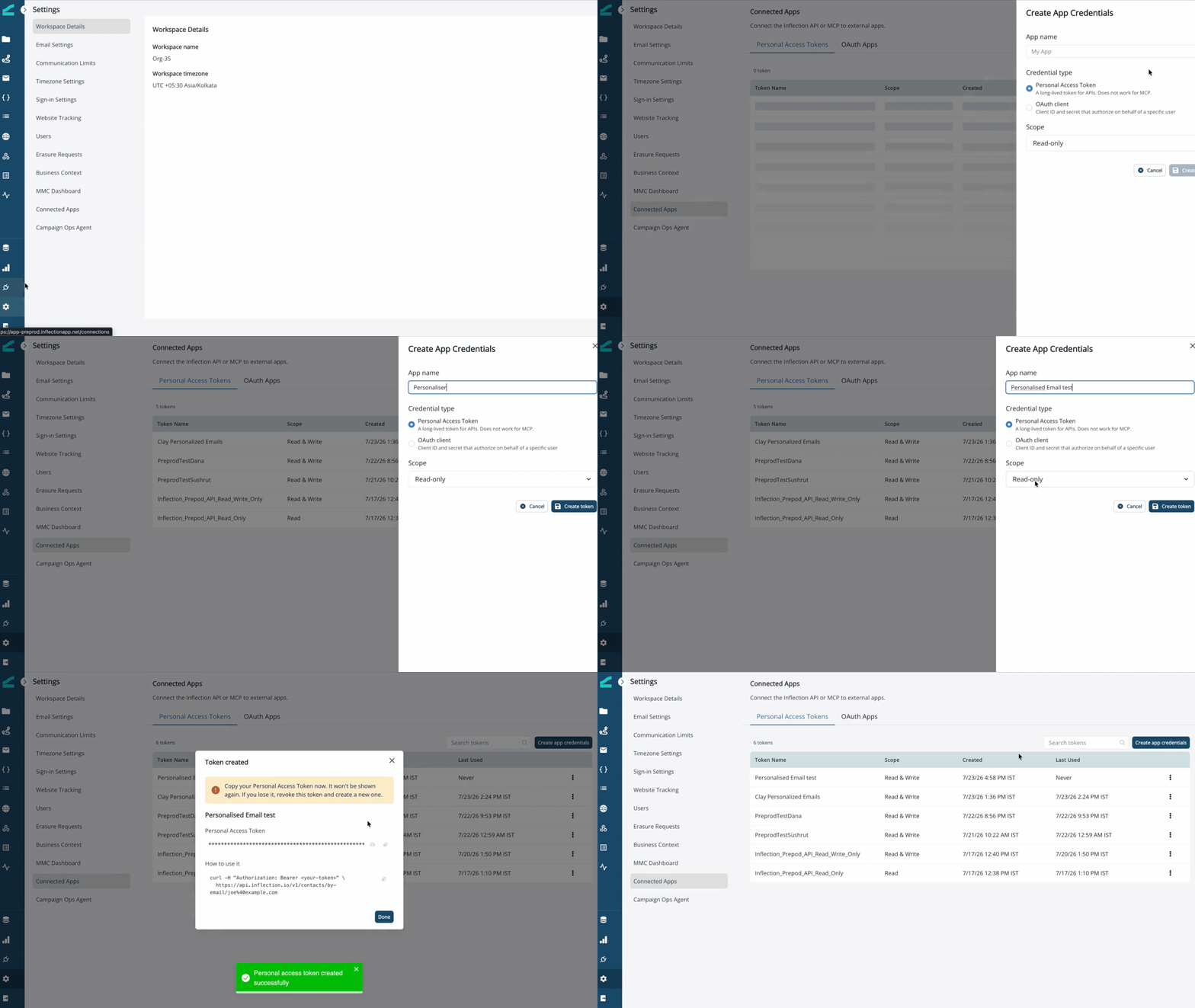
1. In Inflection, go to **Settings** → **Connected Apps**.
2. Open the **Personal Access Tokens** tab and click **Create app credentials**.
3. Name the token and create it. Copy the token and store it securely. It won't be shown again. If you lose it, revoke the token and create a new one.
 ## Use it
Send the token on every request:
```
Authorization: Bearer inf_pat_...
```
Tokens are scoped: **READ** for `GET` calls, **WRITE** for `POST`/`PATCH`/`DELETE`. See [Authentication](/api-reference/authentication) for scopes and how auth failures are reported.
PATs are long-lived tokens for the API. They do **not** work for MCP. MCP clients authenticate through a [connected app's OAuth flow](/agents/connected-apps-oauth).
## Use it
Send the token on every request:
```
Authorization: Bearer inf_pat_...
```
Tokens are scoped: **READ** for `GET` calls, **WRITE** for `POST`/`PATCH`/`DELETE`. See [Authentication](/api-reference/authentication) for scopes and how auth failures are reported.
PATs are long-lived tokens for the API. They do **not** work for MCP. MCP clients authenticate through a [connected app's OAuth flow](/agents/connected-apps-oauth).