> ## Documentation Index
> Fetch the complete documentation index at: https://docs.inflection.io/llms.txt
> Use this file to discover all available pages before exploring further.
# Segment
> Connect product data from your CDP to Inflection for targeting and personalization. Send marketing activities from Inflection to Segment for analytics.
Segment is a customer data platform (CDP) that allows businesses to collect, clean, and control their customer data. It provides a single API to track customer data across multiple platforms and devices, and sends that data to various tools for analytics, marketing, and data warehousing.
Inflection provides a way to send and receive product events from Segment. You can connect Segment to Inflection via the following options:
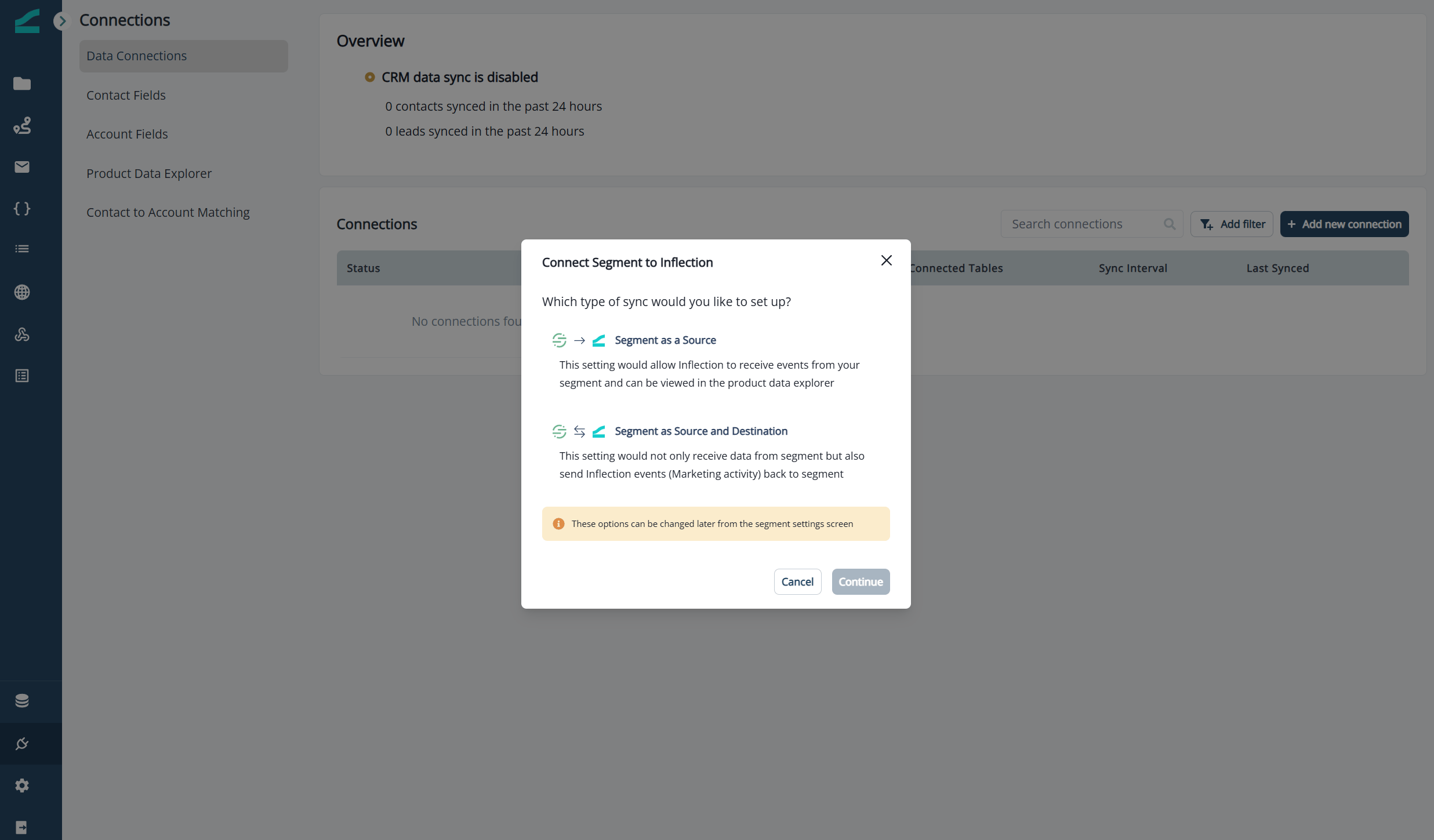
* **Segment as a Source:** Send product events from Segment to Inflection, where they can be used for targeting and segmentation. (These can be product events from your website, application, mobile devices, etc.).
* **Segment as a Source and Destination**: In addition to the above, send Inflection events to Segment. (These include marketing activities such as delivered, opened, clicked, bounced an email.)
## Segment as a Source
Inflection can receive `identify`, `track`, and `group` calls from Segment.
* User information from `identify` calls map to Inflection contacts.
* Workspace information from `group` calls map to Inflection orgs.
* Activities and activity attributes from `track` calls map to product activities.
## Segment as a Destination
Inflection can export marketing activities (email events, journey activity, and form & inbound webhook submissions) directly to Segment. This makes it easier for your marketing, ops, and data teams to create reports and run analytics in their BI tools.
The events and attributes are supported:
| **Event Type** | **Events** | **Attributes** |
| ---------------------------- | -------------------------------------------------------------------------------------------------------- | ---------------------------------------------------------------------------------------------------------------------------------------------------------------------------------------------------------------------------------------------------------------------------------------------------------------------------------------------------------------------------------------- |
| **Email** | **Delivered**
**Opened**
**Link Clicked**
**Bounced**
**Spam**
**Unsubscribed** | **Contact**: `Email`, `Person ID`, `Product User ID`, `Org ID`
**Email Asset**: `Email Asset ID`, `Email Asset Name`, `Email Subject`, `Email Asset Link URL`, `Email event Detail`
**Journey**: `Journey ID`, `Journey Name`, `Journey Run ID`
**Timestamps**: `original_timestamp` (time of the event), `timestamp` (time at which the event was ingested into Segment) |
| **Journey Lifecycle** | **Journey Entered**
**Journey Completed**
**Journey Exited** | **Contact**: `Email`, `Person ID`, `Product User ID`, `Org ID`
**Journey**: `Journey ID`, `Journey Name`, `Run ID`, `Journey Type`, `Trigger Event ID`, `Trigger Source`
**Timestamps**: `original_timestamp` (time of the event), `timestamp` (time at which the event was ingested into Segment) |
| **Forms & Inbound Webhooks** | **Form Submitted**
**Inbound Webhook Submitted** | **Contact**: `Inflection Contact ID`, `Contact Email`
**Timestamps**: `Datetime` |
All ID columns are accompanied by human-friendly attributes to make querying and dash-boarding easy.
**Journey Completed vs. Journey Exited**: **Journey Completed** is triggered when a record finishes all flow steps in the journey and reaches the end. **Journey Exited** is triggered when a record meets the journey's exit criteria and exits the journey.
Email events currently include both the legacy `campaign_id`, `campaign_name`, and `campaign_run_id` properties and their replacements `journey_id`, `journey_name`, and `journey_run_id`. We will be removing `campaign_*` properties in future releases. Update any reports or downstream models that reference the `campaign_*` properties to use the `journey_*` properties.
### Example Payloads
Email event:
```javascript theme={null}
analytics.track('Email Opened', {
'person_id': '1a6d7b02a2f6ba48f0e75d7948066090',
'email': 'jane@acme.com',
'original_timestamp': '2026-07-21T09:29:30.000Z',
'email_asset_id': '6a59ca2f799c0392d414937c',
'journey_id': '6a5dcf5b37610845316e5b0b',
'journey_name': 'Onboarding nurture',
'journey_run_id': '6a5f3bdcca48083b271bb829',
'campaign_id': '6a5dcf5b37610845316e5b0b', // will be deprecated in future
'campaign_name': 'Onboarding nurture', // will be deprecated in future
'campaign_run_id': '6a5f3bdcca48083b271bb829', // will be deprecated in future
'is_unique_open': true
})
```
Journey lifecycle event:
```javascript theme={null}
analytics.track('Journey Entered', {
'person_id': '1a6d7b02a2f6ba48f0e75d7948066090',
'product_user_id': 'u_204981',
'org_id': 'org_5521',
'email': 'jane@acme.com',
'original_timestamp': '2026-07-21T17:02:51.569Z',
'journey_id': '6a5f9a93fb88b0705b53957d',
'journey_name': 'Onboarding nurture',
'run_id': '6a5fa62577f3b0289092e3b7',
'journey_type': 'batch',
'trigger_event_id': '',
'trigger_source': ''
})
```
Form Submitted event:
```javascript theme={null}
analytics.track('Form Submitted', {
'person_id': '1d72628148f5e9sdfsc01cf30515',
'email': 'jane@acme.com',
'original_timestamp': '2026-07-21T17:00:58.569Z',
'form_id': '6a61cfsfdds0c22656feace3',
'form_name': 'Contact Form',
'source': 'generic-form',
'api_key': '0999w9x9ewew0990xxxxxxxx',
'submission_id': '6e392c9b-accb-4e2b',
'submission_data': {
'unsubscribe': true,
'email': 'jane@acme.com',
'date': '2026-07-28T13:36:00.000Z',
'first_name': 'jane'
}
})
```
## Set up & Configuration
### Segment as a Source
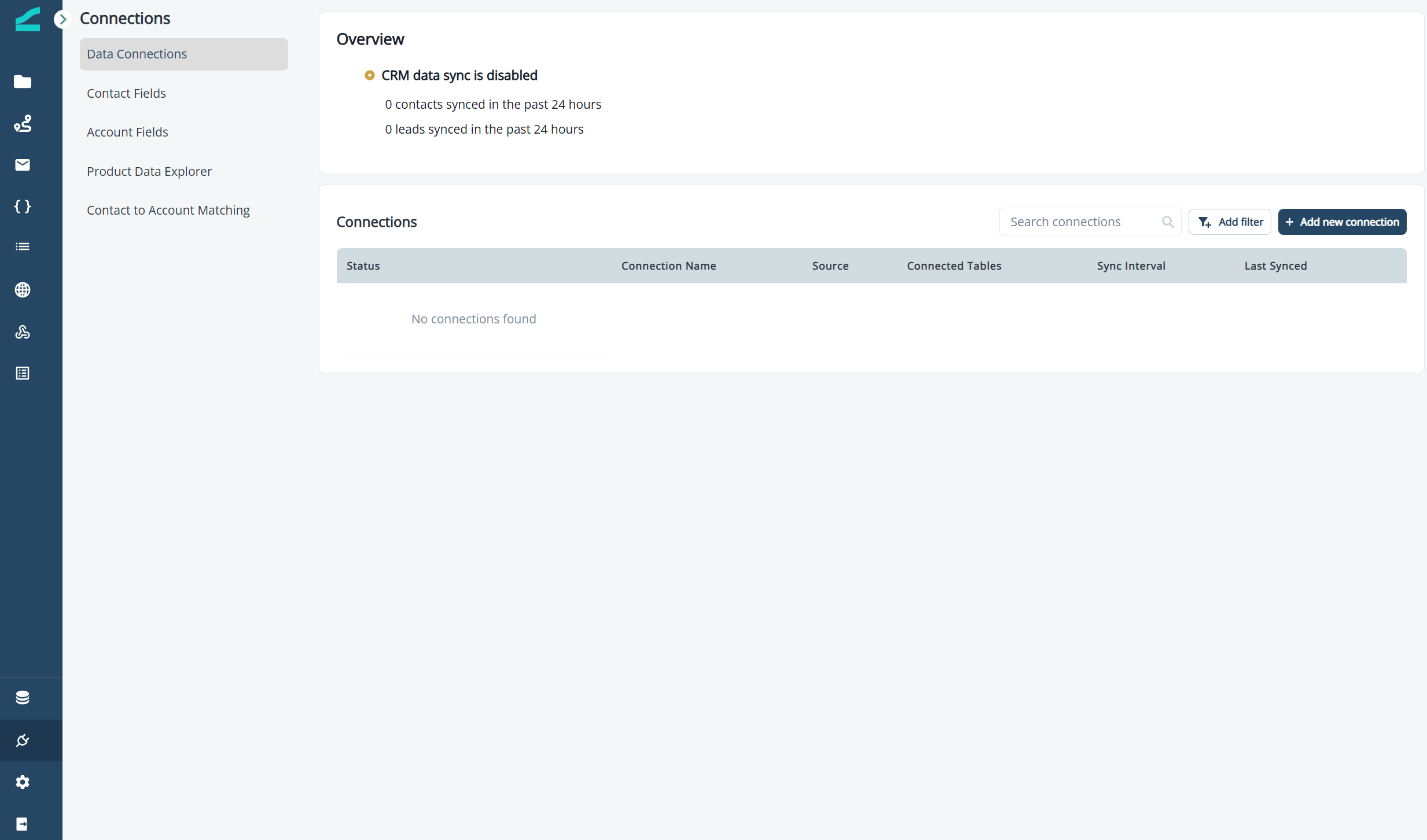
1. Navigate to Connections and select **Add new connection**
 2. Select **Segment as a Source** or **Segment as a Source and Destination**.
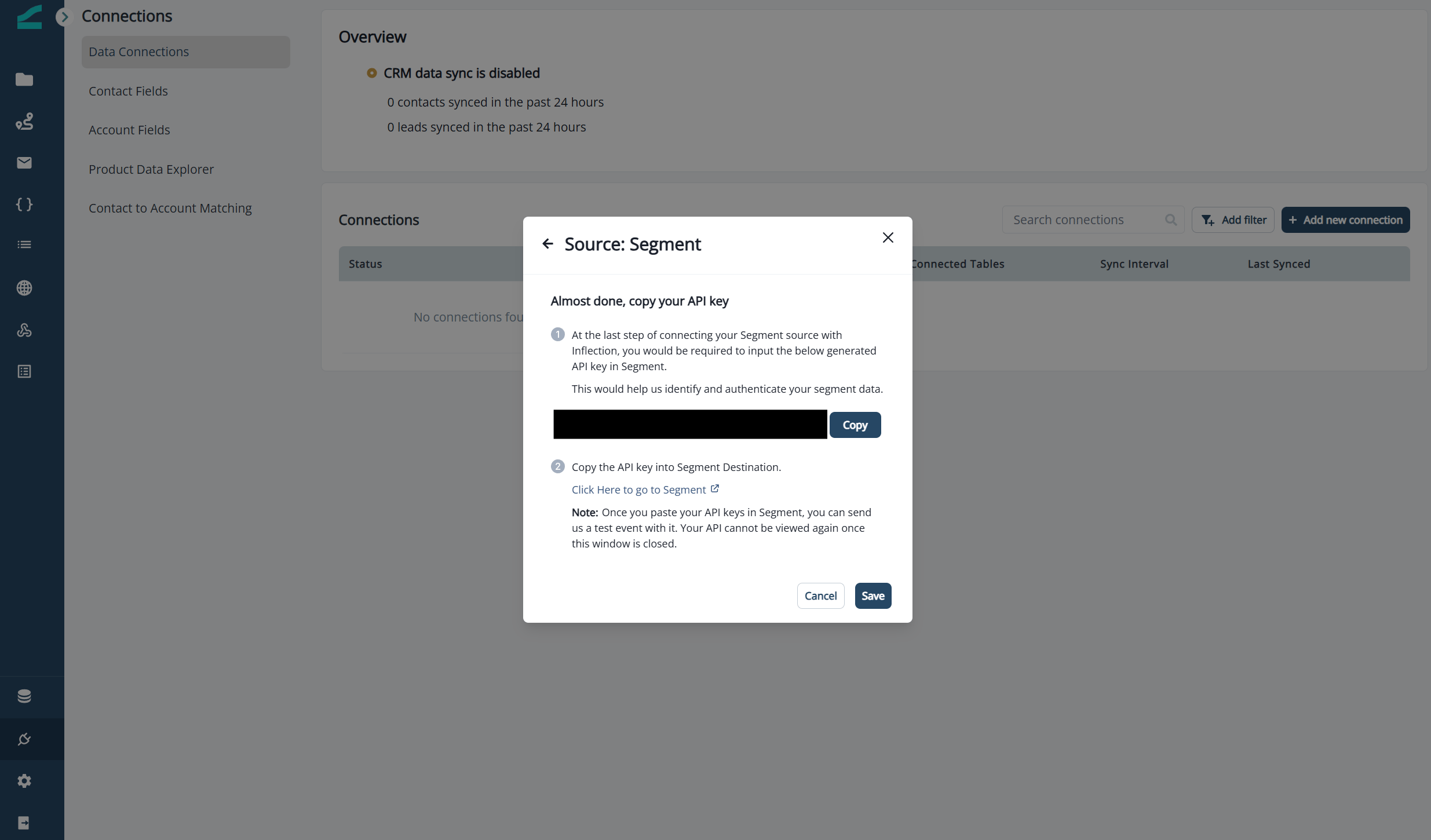
 3. Copy the provided API key into your Segment destination and click **Save** in Inflection.
 ### Segment as a Destination
1. From the Source catalog page in the Segment App, select **Inflection**.
2. Get the API write key generated by Segment, and paste it in inflection.
3. The data will be sent to Segment and you will be able to see those events in Segment.
## Monitoring
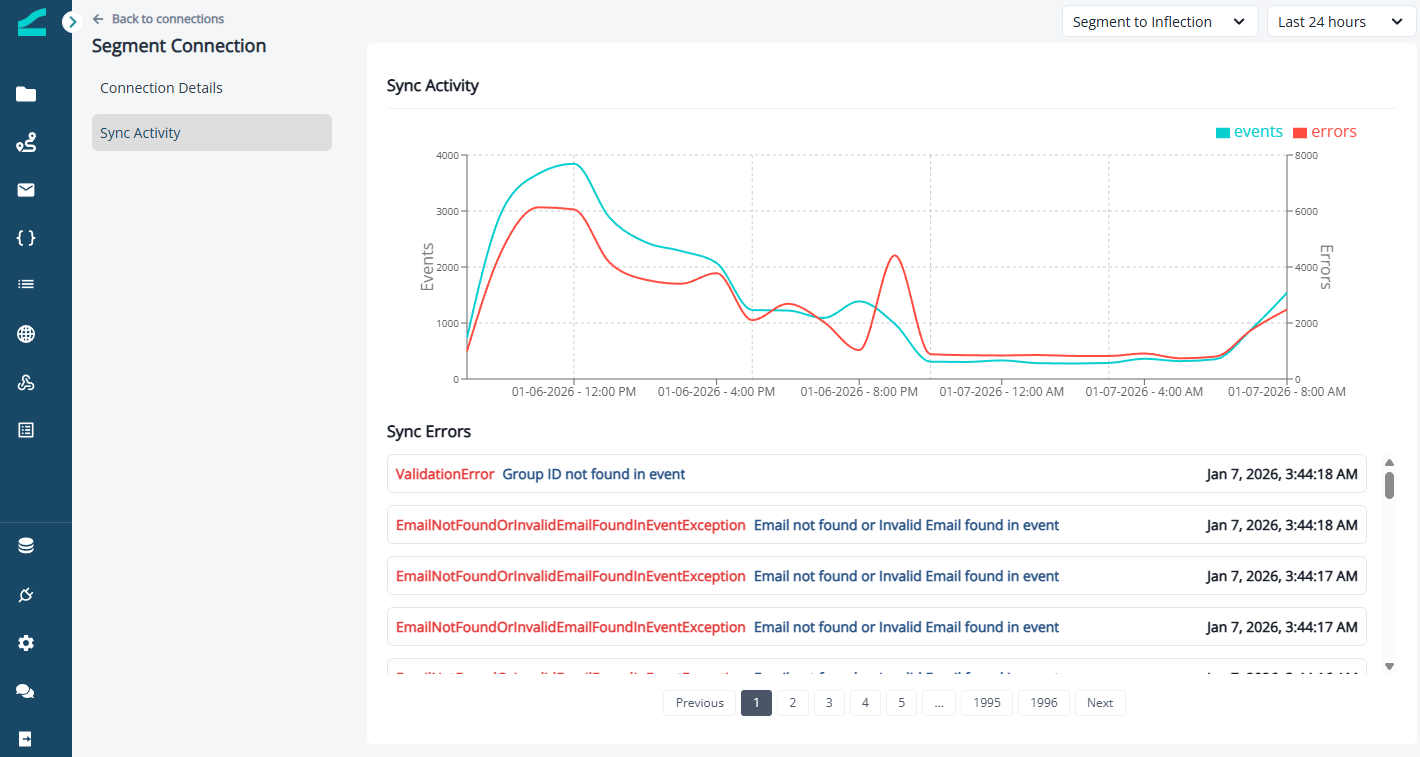
Once configured, monitor incoming data in **Connections** > **Segment** > **Sync Activity**.
### Segment as a Destination
1. From the Source catalog page in the Segment App, select **Inflection**.
2. Get the API write key generated by Segment, and paste it in inflection.
3. The data will be sent to Segment and you will be able to see those events in Segment.
## Monitoring
Once configured, monitor incoming data in **Connections** > **Segment** > **Sync Activity**.
 ## Mapping
For events and attributes coming from Segment to be usable in Inflection, you must complete mapping.
### Segment Events to Inflection
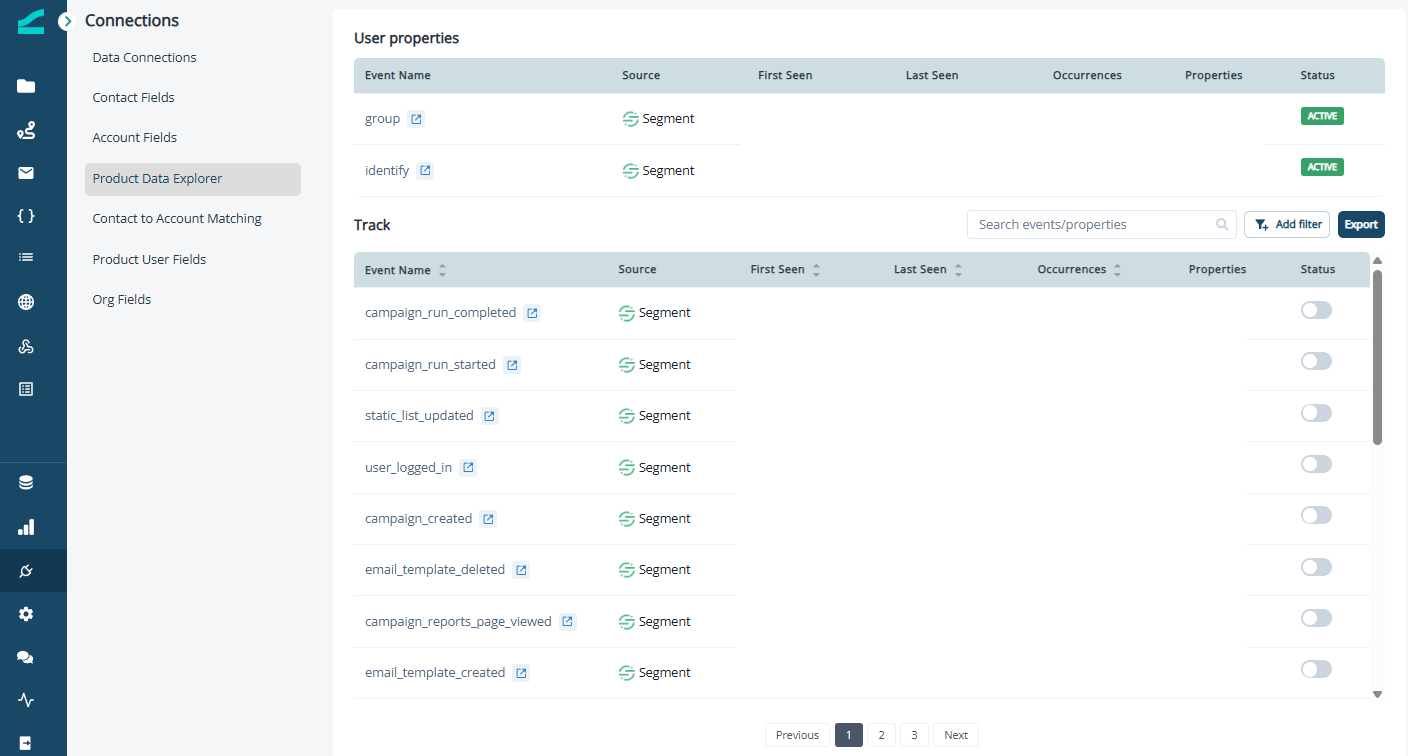
Navigate to **Connections** > **Product Data Explorer**. Use the toggle to the right of each event to enable or disable the event.
When an event is enabled, it is available for segmentation, list building, and personalization.
## Mapping
For events and attributes coming from Segment to be usable in Inflection, you must complete mapping.
### Segment Events to Inflection
Navigate to **Connections** > **Product Data Explorer**. Use the toggle to the right of each event to enable or disable the event.
When an event is enabled, it is available for segmentation, list building, and personalization.
 ### Segment User and Org Attributes to Inflection
Work with your customer support contact to map user and org attributes. To see which attributes are available for mapping, click into the **group** and **identify** headers on the **Product Data Explorer** screen.
Once mapped, these attributes will be available for segmentation, list building, and personalization.
### Segment User and Org Attributes to Inflection
Work with your customer support contact to map user and org attributes. To see which attributes are available for mapping, click into the **group** and **identify** headers on the **Product Data Explorer** screen.
Once mapped, these attributes will be available for segmentation, list building, and personalization.
 Note that to be valid:
* Identify calls require user ID and email address.
* Group calls require user ID and group ID.
### Inflection Events to Segment
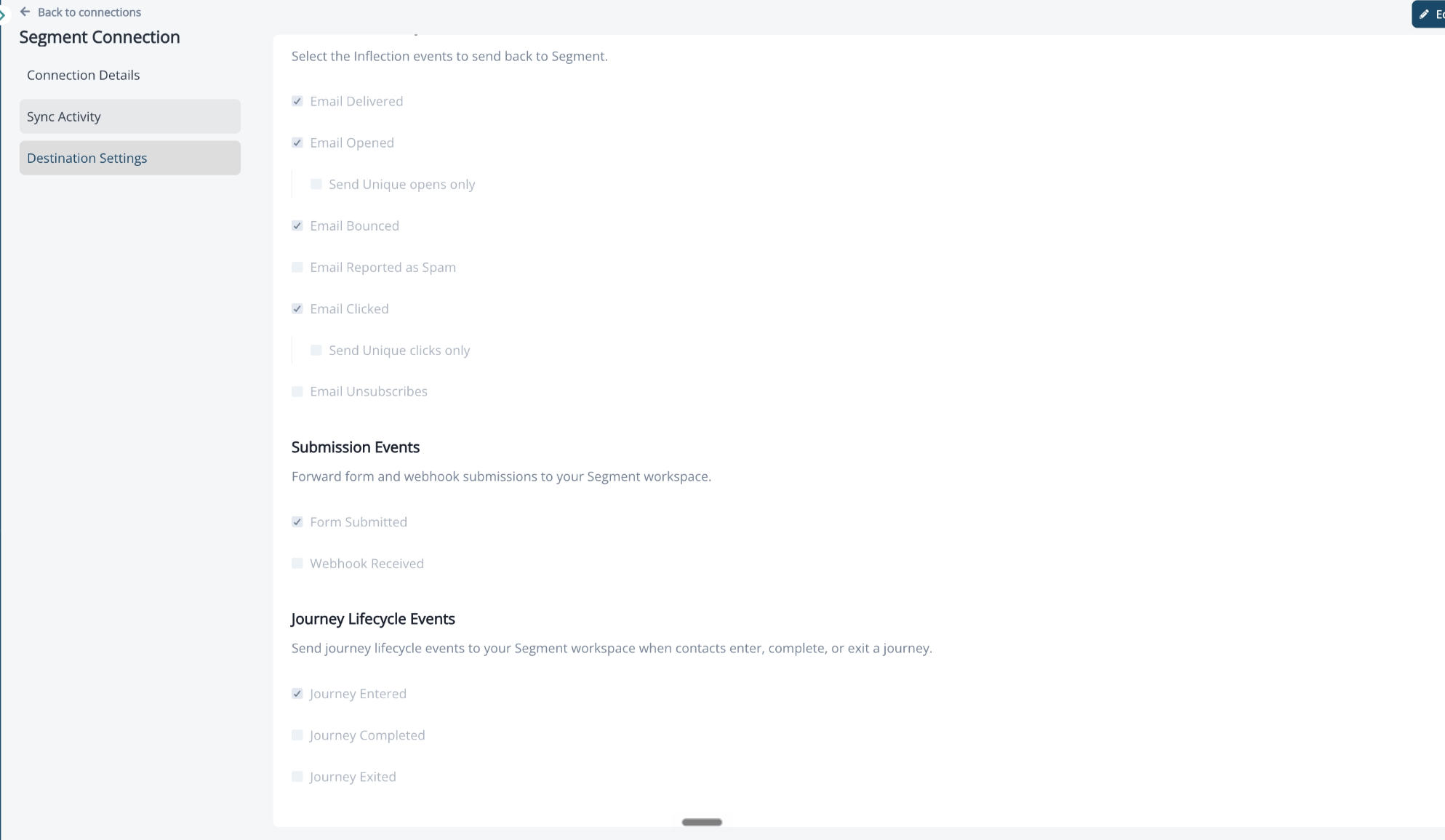
1. Navigate to **Connections** > **Segment** and open the **Destination Settings** tab.
2. Click **Edit** in the top-right corner.
3. Select the Inflection events to send back to Segment:
* Email events: **Email Delivered**, **Email Opened** (optionally **Send Unique opens only**), **Email Bounced**, **Email Reported as Spam**, **Email Clicked** (optionally **Send Unique clicks only**), and **Email Unsubscribes**.
* **Submission Events**: **Form Submitted** and **Webhook Received**.
* **Journey Lifecycle Events**: **Journey Entered**, **Journey Completed**, and **Journey Exited**. Select these to send an event to Segment when a contact enters, completes, or exits a journey.
4. Save your changes.
Note that to be valid:
* Identify calls require user ID and email address.
* Group calls require user ID and group ID.
### Inflection Events to Segment
1. Navigate to **Connections** > **Segment** and open the **Destination Settings** tab.
2. Click **Edit** in the top-right corner.
3. Select the Inflection events to send back to Segment:
* Email events: **Email Delivered**, **Email Opened** (optionally **Send Unique opens only**), **Email Bounced**, **Email Reported as Spam**, **Email Clicked** (optionally **Send Unique clicks only**), and **Email Unsubscribes**.
* **Submission Events**: **Form Submitted** and **Webhook Received**.
* **Journey Lifecycle Events**: **Journey Entered**, **Journey Completed**, and **Journey Exited**. Select these to send an event to Segment when a contact enters, completes, or exits a journey.
4. Save your changes.
 ### Map Segment Identify Traits to Contact Fields
Map the traits coming from your Segment identify calls directly to Inflection contact fields.
1. Navigate to **Connections** > **Contact Fields**.
2. Locate the Inflection contact field you want to populate from Segment. To add a new one, click **+ Add new field**.
3. In the **Source** column, select **Segment**.
4. In the **Contact property** column, select the Segment identify trait to map (e.g., user\_name, email, organisation\_id). The dropdown lists every trait Inflection has seen on a recent identify call for your connection.
5. Click **Save**.
### Map Segment Identify Traits to Contact Fields
Map the traits coming from your Segment identify calls directly to Inflection contact fields.
1. Navigate to **Connections** > **Contact Fields**.
2. Locate the Inflection contact field you want to populate from Segment. To add a new one, click **+ Add new field**.
3. In the **Source** column, select **Segment**.
4. In the **Contact property** column, select the Segment identify trait to map (e.g., user\_name, email, organisation\_id). The dropdown lists every trait Inflection has seen on a recent identify call for your connection.
5. Click **Save**.
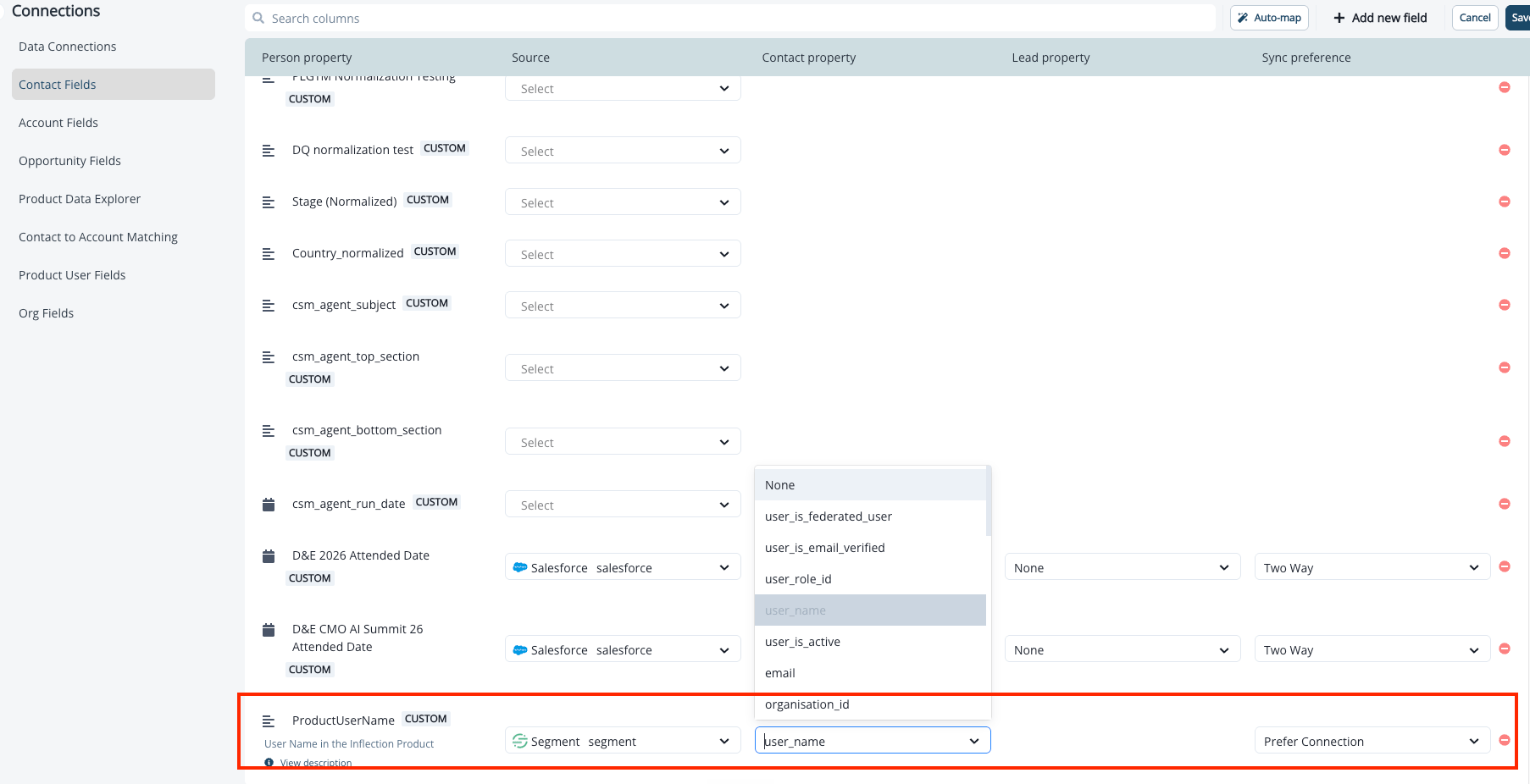 The **Lead property** column stays blank for Segment-sourced fields it only applies when the source is Salesforce. The **Sync preference** column defaults to **Prefer Connection** for Segment, meaning Inflection uses the most recent value coming from your Segment identify calls.
When creating a new custom field for Segment data, make sure the field type matches the trait type in your Segment payload. Mapping an Inflection field that is Boolean to a Segment trait that is a string can result in sync errors.
## Segment Connection FAQs
Inflection maps email addresses from Segment identify calls using the following priority:
1. Top-level email field from the identify call payload
2. Email extracted from traits (properties) if top-level email does not exist
3. Email extracted from the `userId` field if neither above exists
When the header email and traits email differ, Inflection saves the traits email as a property on the user associated with the header email.
A Segment Identify call is required to create a new contact in Inflection. A new contact cannot be created directly from a Segment track call.
If product users are created in Inflection through a data warehouse connection and the product user IDs match the user IDs in Segment track calls, the track call will attach to the existing user or contact record without requiring a Segment identify call.
Inflection will treat nested JSON properties as a string.
The **Lead property** column stays blank for Segment-sourced fields it only applies when the source is Salesforce. The **Sync preference** column defaults to **Prefer Connection** for Segment, meaning Inflection uses the most recent value coming from your Segment identify calls.
When creating a new custom field for Segment data, make sure the field type matches the trait type in your Segment payload. Mapping an Inflection field that is Boolean to a Segment trait that is a string can result in sync errors.
## Segment Connection FAQs
Inflection maps email addresses from Segment identify calls using the following priority:
1. Top-level email field from the identify call payload
2. Email extracted from traits (properties) if top-level email does not exist
3. Email extracted from the `userId` field if neither above exists
When the header email and traits email differ, Inflection saves the traits email as a property on the user associated with the header email.
A Segment Identify call is required to create a new contact in Inflection. A new contact cannot be created directly from a Segment track call.
If product users are created in Inflection through a data warehouse connection and the product user IDs match the user IDs in Segment track calls, the track call will attach to the existing user or contact record without requiring a Segment identify call.
Inflection will treat nested JSON properties as a string.