> ## Documentation Index
> Fetch the complete documentation index at: https://docs.inflection.io/llms.txt
> Use this file to discover all available pages before exploring further.
# Account Scoring
> Build models that grade every account from 0 to 100 based on the signals that define a strong fit for your business.
Account Scoring lets you build models that grade every account in your tenant from 0 to 100 based on the signals that define a strong fit for your business. Once a model is active, the score becomes a regular field on the Account object — available immediately in dynamic lists, journey branches, and anywhere else you use account properties.
**Permissions:** Workspace admins can create, edit, and activate scoring models. Anyone in your workspace can use score fields the same way they use any other account property.
## Create a Scoring Model
Click **Account Scoring** in the left navigation, then click **New scoring model** in the top right.
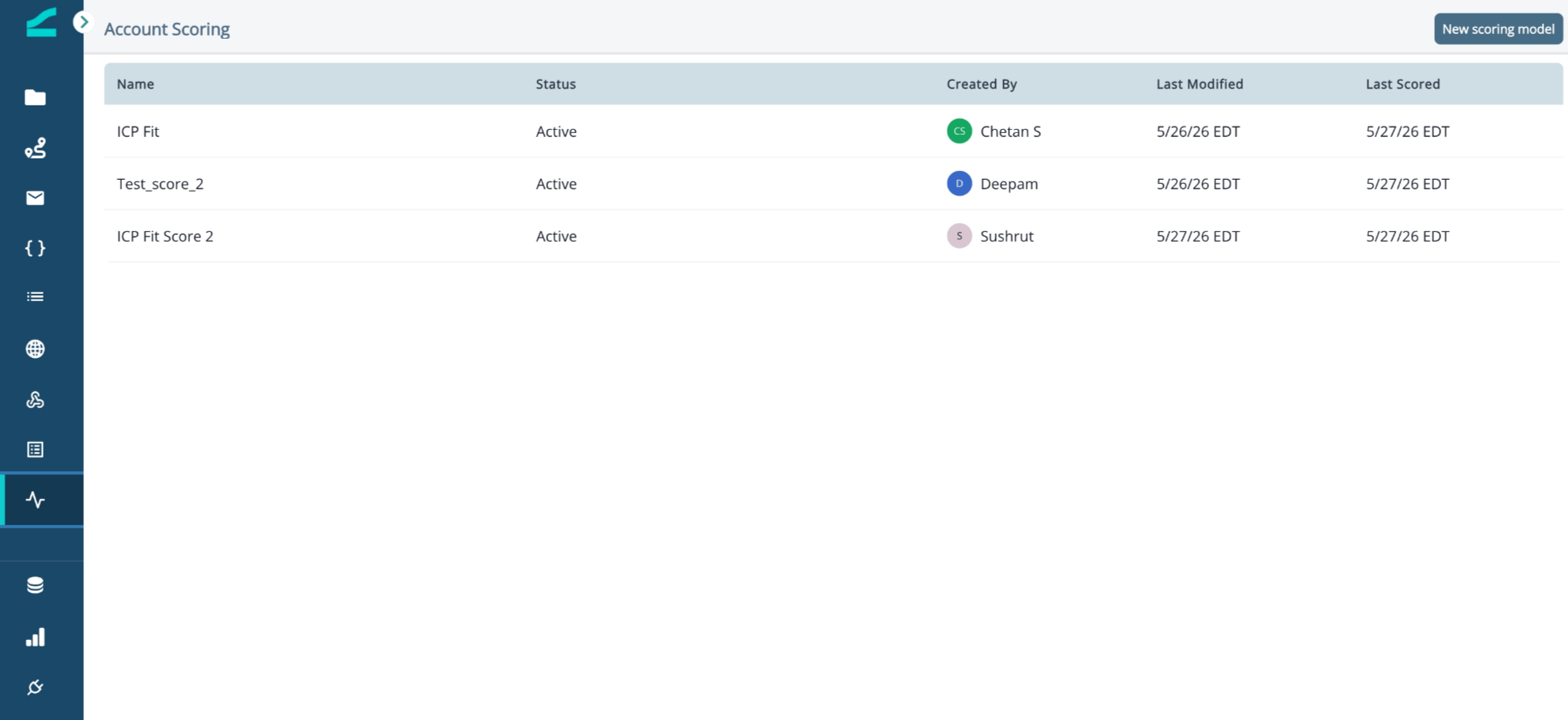 A new model starts in **Draft** status. Draft models do not score any accounts and have no effect on your data until you activate them.
### Add Signals
Each model is built from signals: characteristics of an account that indicate fit. Inflection provides a catalog of signals you can browse or search.
1. In the **Available Signals** panel, browse signals by category (**All**, **Profile**, **Org**, **Relevance**, **Stack**) or type into the search field to filter.
2. Drag a signal into **Positive Signals** to count it toward a higher score, or into **Negative Signals** to count it toward a lower score.
3. Adjust the weight on each signal to reflect how much it should influence the score relative to the others.
A new model starts in **Draft** status. Draft models do not score any accounts and have no effect on your data until you activate them.
### Add Signals
Each model is built from signals: characteristics of an account that indicate fit. Inflection provides a catalog of signals you can browse or search.
1. In the **Available Signals** panel, browse signals by category (**All**, **Profile**, **Org**, **Relevance**, **Stack**) or type into the search field to filter.
2. Drag a signal into **Positive Signals** to count it toward a higher score, or into **Negative Signals** to count it toward a lower score.
3. Adjust the weight on each signal to reflect how much it should influence the score relative to the others.
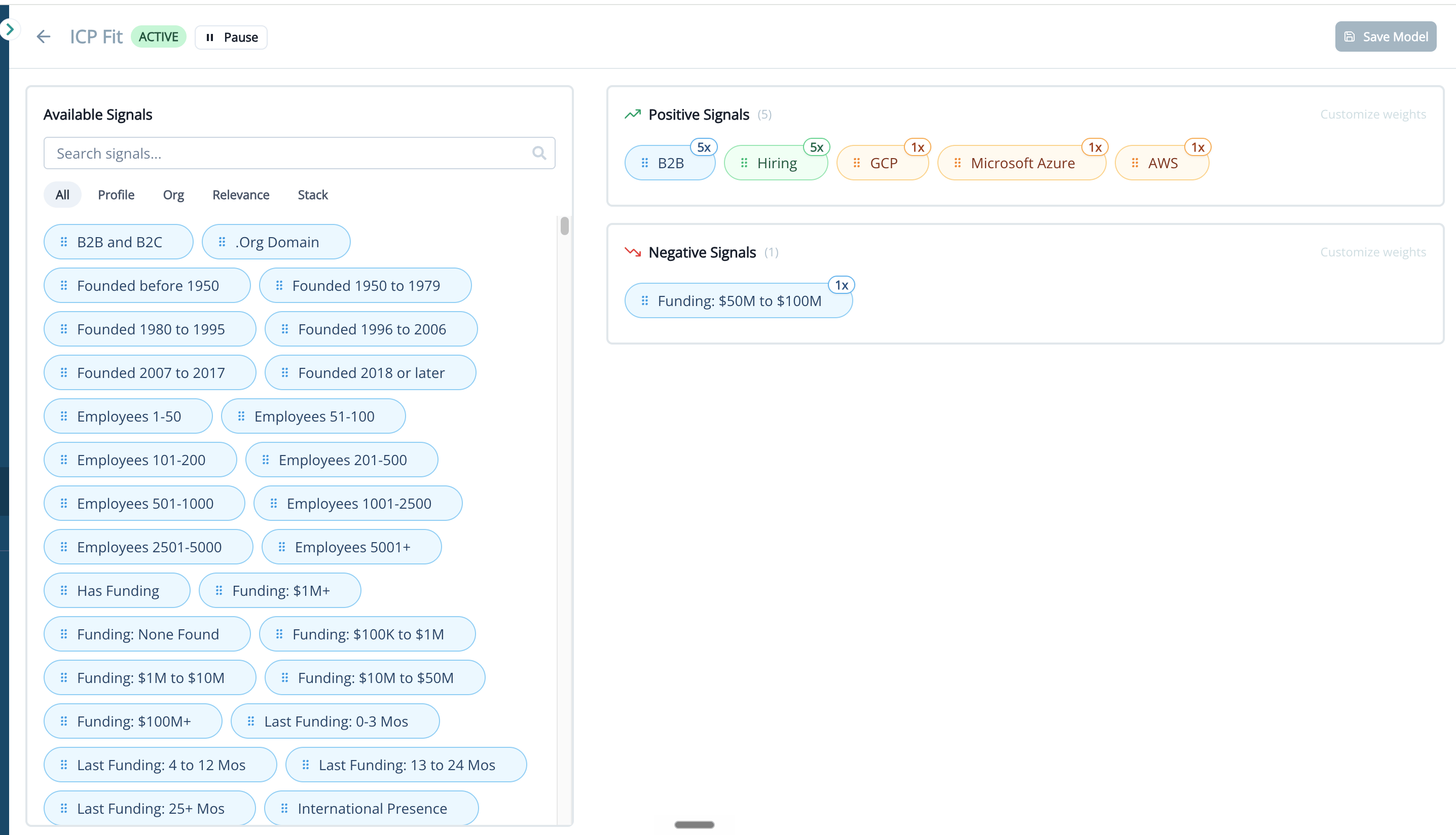 Positive signals raise an account's score; negative signals lower it. Use negative signals to express what disqualifies an account from being a strong fit.
### Save and Activate
Click **Save Model** to keep your changes in Draft. When you're ready to score all accounts in your tenant against the model, change its status to **Active**.
Activating a model immediately triggers a scoring run across every account in your tenant. The page shows a progress indicator while accounts are being scored. Most tenants complete in a few seconds; larger tenants take longer.
## How Scores Appear on the Account
Each active scoring model produces a field on the Account object, named after the model. Scores range from **0 to 100**, where a higher number means a stronger fit.
Positive signals raise an account's score; negative signals lower it. Use negative signals to express what disqualifies an account from being a strong fit.
### Save and Activate
Click **Save Model** to keep your changes in Draft. When you're ready to score all accounts in your tenant against the model, change its status to **Active**.
Activating a model immediately triggers a scoring run across every account in your tenant. The page shows a progress indicator while accounts are being scored. Most tenants complete in a few seconds; larger tenants take longer.
## How Scores Appear on the Account
Each active scoring model produces a field on the Account object, named after the model. Scores range from **0 to 100**, where a higher number means a stronger fit.
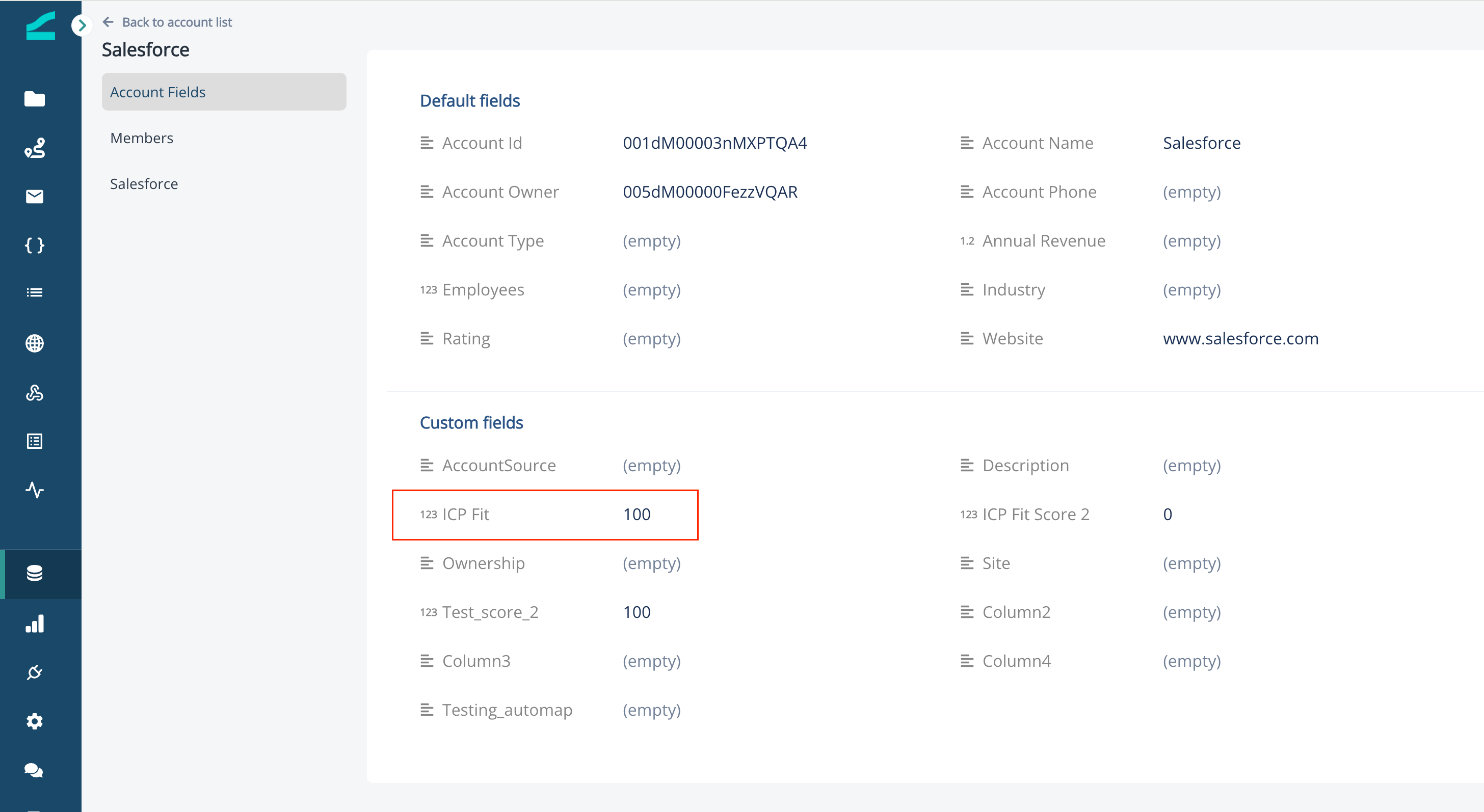 Multiple scoring models can be active at the same time. Each model produces its own field on the Account object, so a single account can carry several scores in parallel.
## Use Scores in Audiences and Journeys
Because scores are regular account fields, they work everywhere other account properties do.
### Filter a Dynamic List by Score
In the audience builder, add an **Account members** group, then add a person property of `account.` (for example, `account.Fit Score`). Use any numeric operator — **greater than**, **less than**, **between** — to define your threshold.
Multiple scoring models can be active at the same time. Each model produces its own field on the Account object, so a single account can carry several scores in parallel.
## Use Scores in Audiences and Journeys
Because scores are regular account fields, they work everywhere other account properties do.
### Filter a Dynamic List by Score
In the audience builder, add an **Account members** group, then add a person property of `account.` (for example, `account.Fit Score`). Use any numeric operator — **greater than**, **less than**, **between** — to define your threshold.
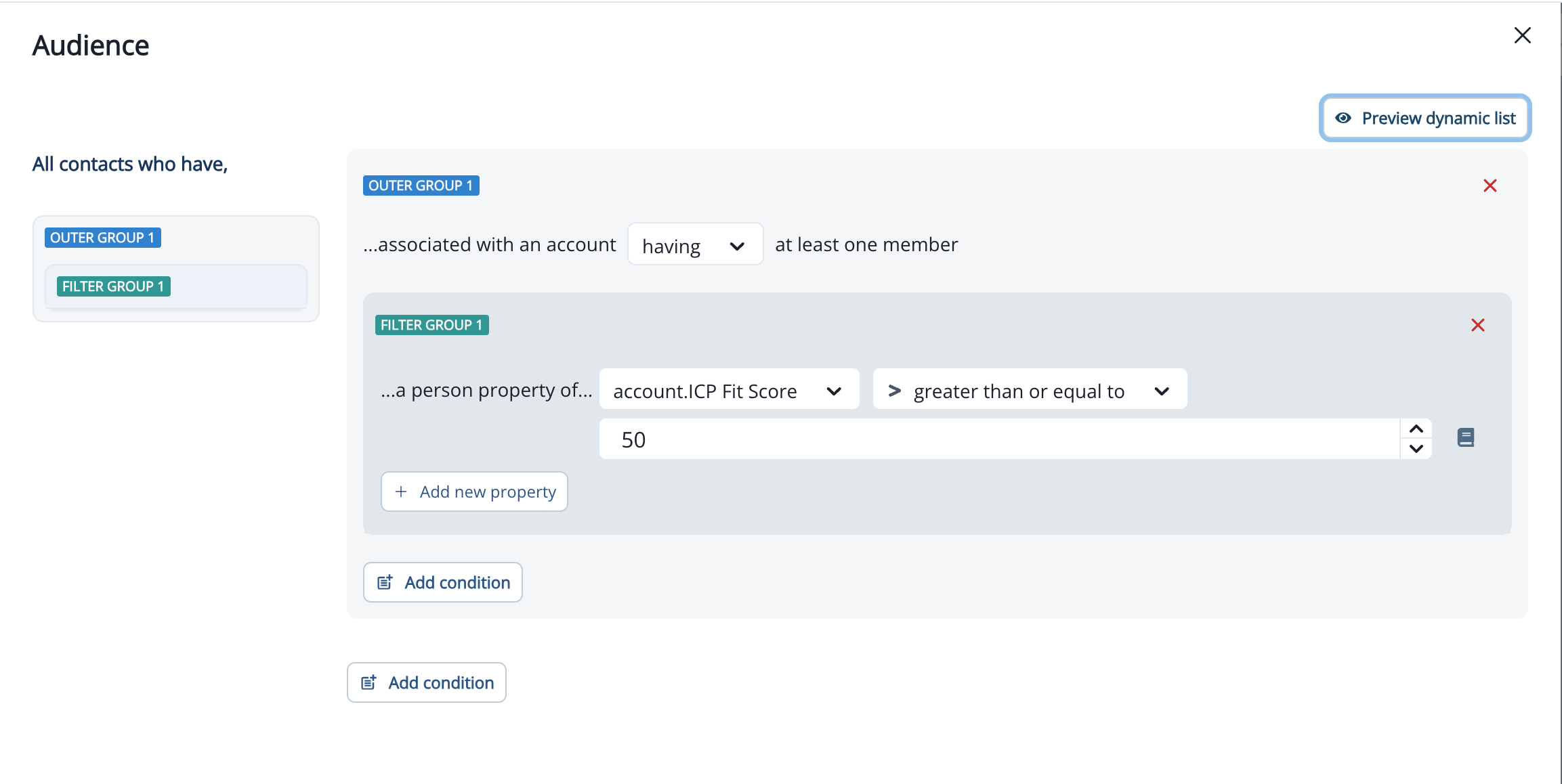 Audiences built this way maintain themselves: as scores update, contacts move in and out of the list automatically. Anything pointed at the list: journeys, segments, exports — becomes score-driven.
### Branch and Trigger Journeys by Score
On the Journey Canvas, use **Branch by Value** to split contacts into paths based on their account's score (for example, one path for scores above 80, another for 50–80, another below 50). For scheduled journeys, use a score-based dynamic list as the entry audience so contacts qualify the moment they cross a threshold.
Learn more about branching: [Journey Flow Steps Reference](/journeys/journey-flow-steps)
## When Scores Are Recalculated
Inflection recalculates scores at three times:
1. **On activation:** when you change a model's status from Draft to Active, every account is scored immediately.
2. **On model edit:** saving changes to an active model triggers a full rescore of every account against the updated logic.
3. **Nightly:** Inflection rescores every account against every active model once per day so scores stay current as the underlying account data changes.
## Common Use Cases
* **Maintain a self-updating ICP list.** Build a dynamic list of accounts where `account.Fit Score > 80` and reference it across journeys and segments. As scores change, the list stays current without manual upkeep.
* **Route accounts by tier.** Use **Branch by Value** on the score field to send high-fit accounts down an executive-touch path and lower-fit accounts down a self-serve nurture.
* **Suppress poor-fit accounts.** Add an exclusion filter (`account.Fit Score < 30`) to outbound journeys to keep marketing focused on accounts worth nurturing.
* **Run multiple models in parallel.** Score the same accounts against different fit definitions — for example, a new-logo model and an expansion model — and reference each score independently.
## Frequently Asked Questions
Not in this release. Scores are stored on the Inflection Account object only. Syncing scores back to Salesforce is on the roadmap for a future release.
Not in this release. The signal data the model evaluates is not exposed as separate account fields and is not synced to external systems. This is planned for a future release.
Not in this release. Activating a model scores accounts based on their current state. Applying a model retroactively against historical account states is on the roadmap.
You can run multiple active models in parallel. Each active model produces its own field on the Account object, and the fields operate independently.
Saving a change to an active model triggers a full rescore. Dynamic lists and journey branches that reference the score field will re-evaluate against the new scores on the next evaluation cycle.
Draft models exist only as configurations — they do not score any accounts. Change the model's status to **Active** to start scoring.
Audiences built this way maintain themselves: as scores update, contacts move in and out of the list automatically. Anything pointed at the list: journeys, segments, exports — becomes score-driven.
### Branch and Trigger Journeys by Score
On the Journey Canvas, use **Branch by Value** to split contacts into paths based on their account's score (for example, one path for scores above 80, another for 50–80, another below 50). For scheduled journeys, use a score-based dynamic list as the entry audience so contacts qualify the moment they cross a threshold.
Learn more about branching: [Journey Flow Steps Reference](/journeys/journey-flow-steps)
## When Scores Are Recalculated
Inflection recalculates scores at three times:
1. **On activation:** when you change a model's status from Draft to Active, every account is scored immediately.
2. **On model edit:** saving changes to an active model triggers a full rescore of every account against the updated logic.
3. **Nightly:** Inflection rescores every account against every active model once per day so scores stay current as the underlying account data changes.
## Common Use Cases
* **Maintain a self-updating ICP list.** Build a dynamic list of accounts where `account.Fit Score > 80` and reference it across journeys and segments. As scores change, the list stays current without manual upkeep.
* **Route accounts by tier.** Use **Branch by Value** on the score field to send high-fit accounts down an executive-touch path and lower-fit accounts down a self-serve nurture.
* **Suppress poor-fit accounts.** Add an exclusion filter (`account.Fit Score < 30`) to outbound journeys to keep marketing focused on accounts worth nurturing.
* **Run multiple models in parallel.** Score the same accounts against different fit definitions — for example, a new-logo model and an expansion model — and reference each score independently.
## Frequently Asked Questions
Not in this release. Scores are stored on the Inflection Account object only. Syncing scores back to Salesforce is on the roadmap for a future release.
Not in this release. The signal data the model evaluates is not exposed as separate account fields and is not synced to external systems. This is planned for a future release.
Not in this release. Activating a model scores accounts based on their current state. Applying a model retroactively against historical account states is on the roadmap.
You can run multiple active models in parallel. Each active model produces its own field on the Account object, and the fields operate independently.
Saving a change to an active model triggers a full rescore. Dynamic lists and journey branches that reference the score field will re-evaluate against the new scores on the next evaluation cycle.
Draft models exist only as configurations — they do not score any accounts. Change the model's status to **Active** to start scoring.