

How Data Warehouse Import Works
You create one connection per warehouse and choose which Inflection objects it fills: Contacts, Product users, Product activity, Accounts, Organizations, and Product user organizations. For each object you pick a source table or view, confirm the columns that identify each row, and choose how Inflection reads it. A few rules shape every connection:- Tables and views both work. Inflection reads a view exactly like a table. This page says “table” for both.
- One connection can read from several schemas. Schema is a filter when you pick sources, not a limit on the connection.
- Each object is claimed by one connection at a time. You can connect the same object to other sources such as Salesforce or Segment, but not to a second warehouse connection.
- Fields flow one way. Inflection reads from the warehouse and writes to Inflection. Nothing is written back to your source tables.
- Two ways to read a source. Inflection either reads your table as it is, or drafts a view that joins, filters, or deduplicates it for you. See Choose a Sync Method.
Where Inflection Writes
On Snowflake and Amazon Redshift, Inflection keeps a small schema in your warehouse called the write location. It holds any views Inflection drafts for you and an ID-only snapshot used to detect deleted rows. You choose the write location during setup: a database and schema on Snowflake, or a schema in the source database on Redshift. On BigQuery and Databricks, Inflection creates nothing in your warehouse and asks for no write access.Load order matters. Organizations and product users must land before or alongside their product activity. If activity arrives first, it has nothing to attach to and looks missing until the user record catches up.
What Data to Send
Sync all of your product users and organizations, not just the ones you plan to target today. For product activity, sync every event that marketing, growth, sales, or success might use: signups, feature usage, upgrades, invites, and similar. Skip debugging, logging, and internal engineering events. When in doubt, sync more.Choose Your Objects
Every object is optional. Pick the ones your data supports.
Account or Organization? These are different objects. An Account is the company as your CRM tracks it, and it maps to your CRM Account. An Organization is a workspace or tenant inside your product.
One organization per user, or many? If an email address can only belong to one organization in your product, put the organization ID on the Product users table and skip the Product user organization object. If one person can belong to several workspaces, sync the Product user organization object so each membership is its own row.
Do I need a Contacts table if I sync Product users? Usually not. Inflection creates a Contact for every new product user that does not already match one by email. The most common case for syncing contacts from data warehouse is when a customer has a non-Salesforce CRM.
Before You Start
You need:- Admin access to your Inflection workspace.
- Your warehouse prepared by your data team. Each warehouse page lists the user, role, grants, and network steps.
- For Amazon Redshift, Inflection’s IP addresses allowed in your cluster security group before you connect. Snowflake and Databricks need this only if your account restricts access by IP. BigQuery does not.
- A modified date column on every source table except Product activity, and its time zone. Inflection uses it to sync only rows that changed since the last run. Product activity uses its event timestamp instead.
- On Snowflake, a database and schema for the write location. On Redshift, a schema name in the source database.
- Snowflake Setup — Key-pair authentication, service user, default warehouse, grants, and storage integration.
- BigQuery Setup — Share your tables with Inflection’s service account.
- Databricks Setup: Service Principal — Create a service principal, grant read access, and set up Databricks storage.
- Databricks Delta Sharing — For workspaces that already import over Delta Sharing.
- Amazon Redshift Setup — Allow Inflection’s IPs, create a user, and grant access.
Source Table Requirements
At the Set up stage, Inflection probes each source table, detects the columns that identify a row, and asks you to confirm them. Every other column syncs as an attribute that you map to Inflection fields in Unified Mapping. Product activity also has its identity columns confirmed in the wizard, but its other columns are not mapped in Unified Mapping. Instead you choose how event properties are read: either from a single JSON column, or by picking the property columns to bundle onto each event. Either way they land in the event’s properties, keep their column names, and are available as filters when you build audiences. Requirements that apply to every object:- Email columns must be plain strings. An email wrapped in JSON is treated as invalid, and the row is skipped or resolved from a different, less complete row.
- Declare the time zone of your modified date. Inflection uses this column as the incremental sync cursor. An ambiguous timestamp silently skips or re-reads rows, so the wizard asks for the time zone if the column does not carry one.
- Add audit columns. A column that records when a row was really inserted or last changed, such as
updated_at, lets Inflection pick up late-arriving rows. A column that only records the query run time does not.
Product Activity
Product activity is the stream of events from your product, usually produced by a CDP such as Segment or Rudderstack, or a product analytics tool such as Amplitude, Pendo, or Heap.
Event properties come from either one JSON column or a set of columns you select. Property names carry over from the columns, and there is no per-property mapping.
Map Organization ID to make your product activity org-aware. Audience filters that use Within an org where… count only activity that carries an organization ID, so events synced without one are ignored by those filters. They still count toward filters that do not require an org. See Building Audiences for how to build an org-aware filter.
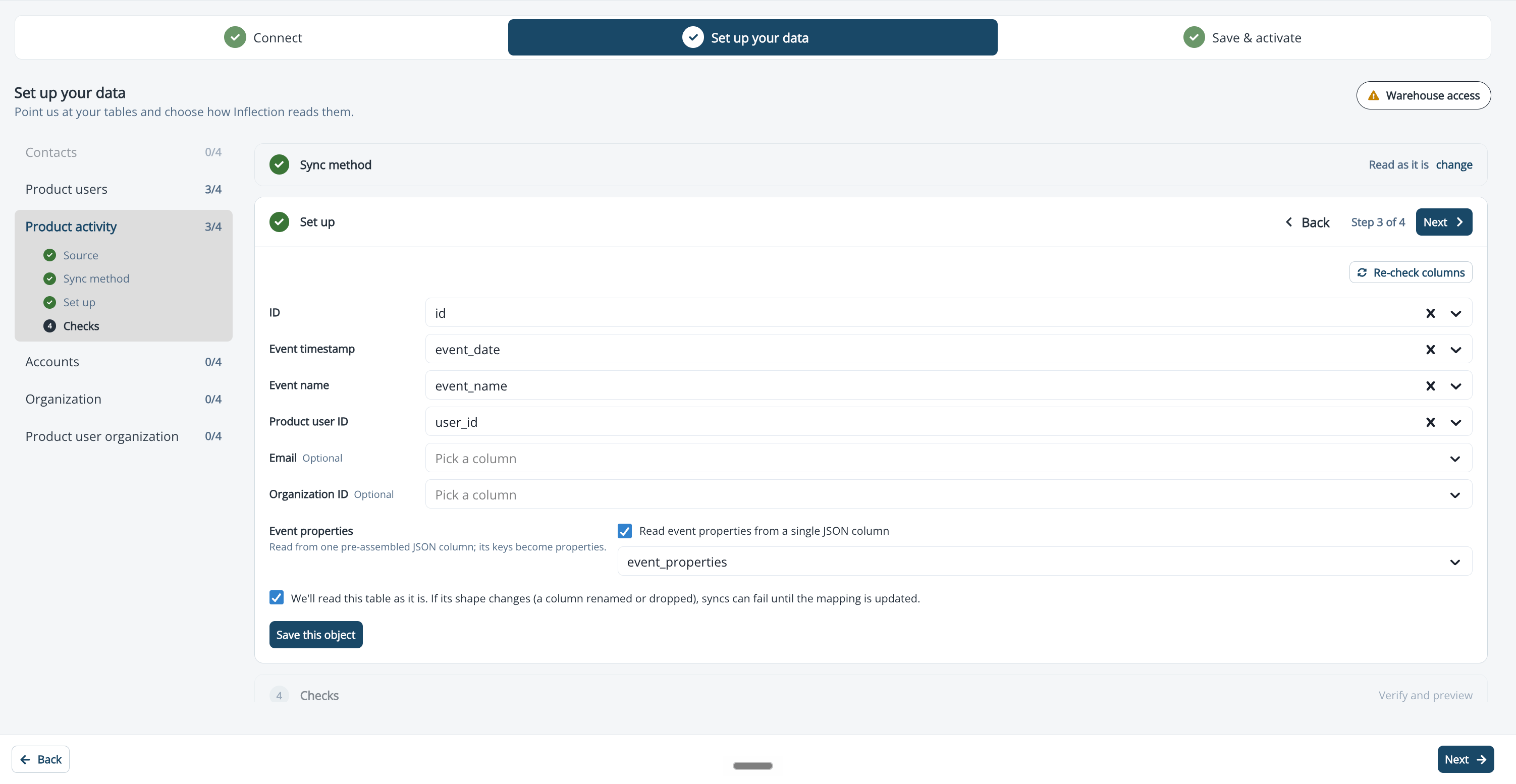
If your events live in one table per event, or need reshaping, either pick the tables and choose We draft a view for you, or build a view in your warehouse that unions them and pick that view as the source.
Product Users
A Product user is a person using your product. Every product user is tied to an existing or creates a new Contact, and can have an Organization and Product activity.
Other columns on the Product users table, such as first and last name, map to Product user fields in Unified Mapping. They cannot be mapped to Contact fields.
Organizations
Organizations are the groups of people in your product, often called workspaces or tenants.
A Name column is strongly recommended. Without it, Inflection shows the ID.
An attribute reaches Inflection only if it lives on the table you map to Organization. If plan type is really a property of a workspace but you mapped a parent company table to Organization, plan type will not appear where you expect. Map the workspace table instead.
Product User Organization
This object records that a product user belongs to an organization. Use it when one person can belong to several organizations.
Custom columns describe the user’s relationship to the organization, such as
role or is_admin.
Accounts
Accounts represent the Account object in your CRM and are distinct from Organizations. Most customers sync Accounts from Salesforce. Sync Accounts from your warehouse when your CRM has no direct Inflection integration, or when you want to enrich CRM accounts with warehouse data.
Strongly recommended columns:
- Website or domain, used to match Contacts to Accounts.
- Name, shown in the Inflection UI. Without it, Inflection shows the ID.
Contacts
Contacts are unique by email address. Rows with a null or invalid email are skipped.Set Up the Connection
Setup is a three-step wizard: Connect, Set up your data, and Save & activate. You can leave at any point. The connection is saved as a draft, appears on the Connections list, and resumes where you left off. To start, click Connections in the left navigation, open Data Connections, and click Add new connection. Choose your warehouse under Data Warehouse and pick the read option.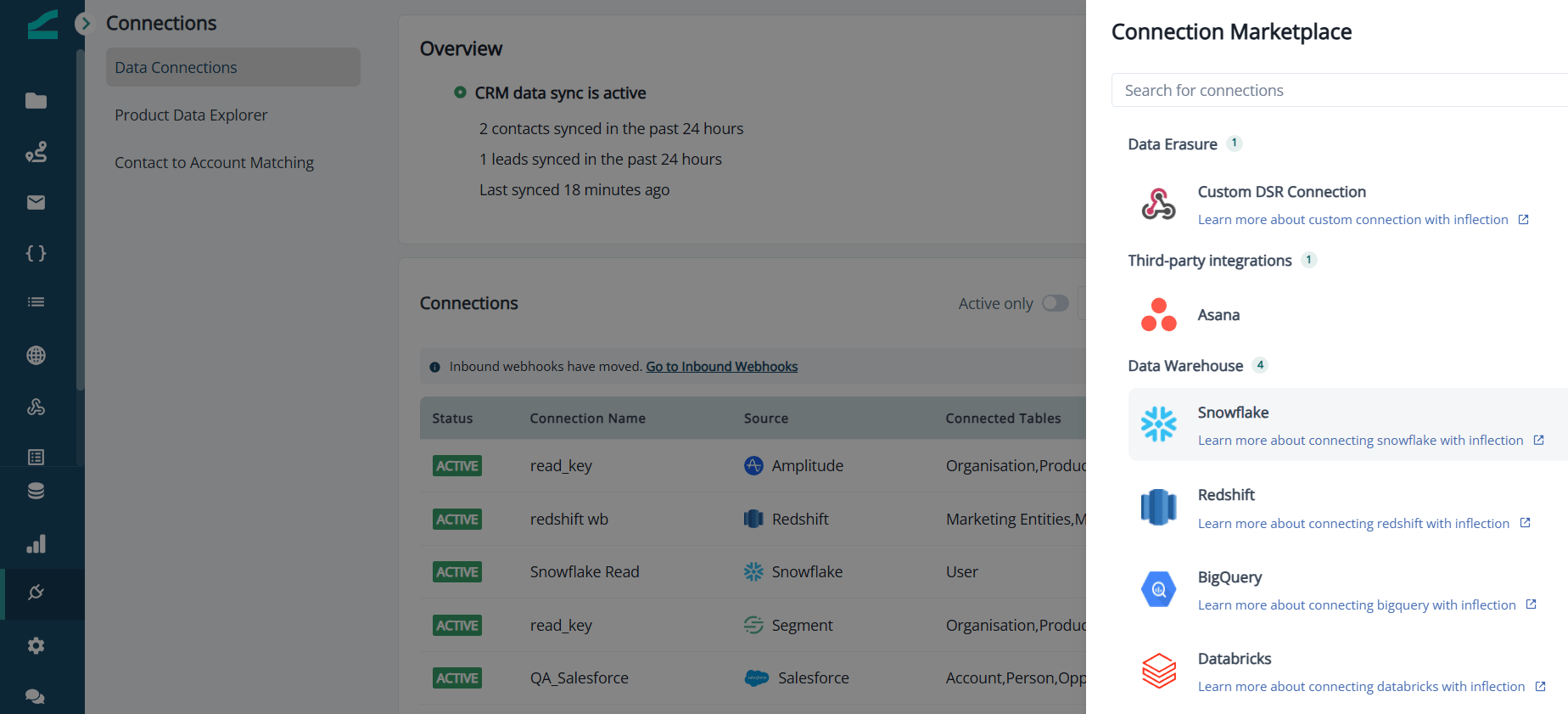
Step 1: Connect
- Enter the connection fields for your warehouse. The exact fields are listed on each warehouse page.
- On Amazon Redshift, the step shows Allow these IPs first with the addresses to add to your cluster security group. Select I have allowed these IPs to enable the test. On Snowflake and Databricks, an optional Network access section shows the same list for accounts that restrict access by IP.
- Click Test connection. The test checks that the host is reachable, the port is open, and the credentials authenticate. It does not check read or write access yet. On success you see a confirmation such as Connected to Snowflake. Credentials verified.
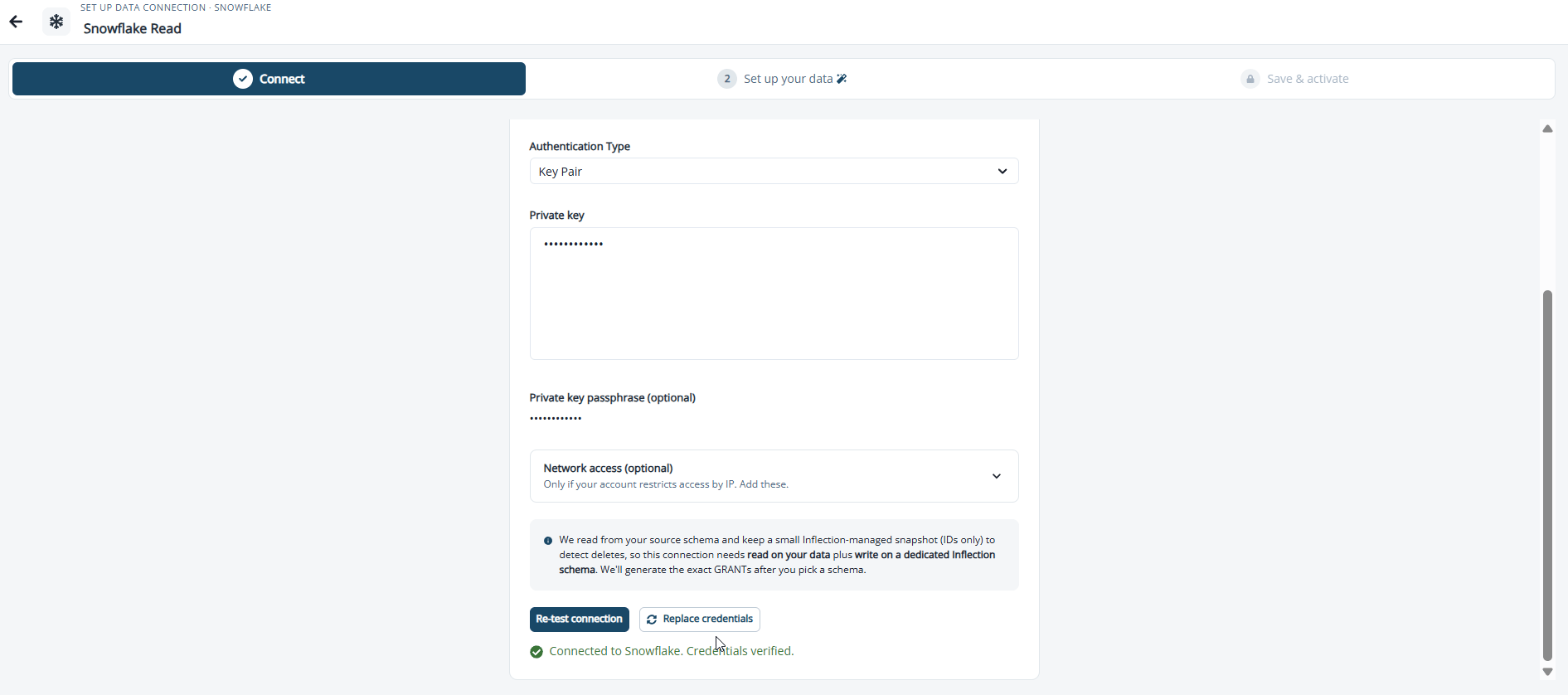
Snowflake: Snowflake requires multi-factor authentication for password logins by people. Inflection connects as a service and cannot answer an MFA prompt, so use Key Pair authentication or a Snowflake user created with
TYPE = SERVICE. See Snowflake Setup for the key-pair steps.Step 2: Set Up Your Data
This step has two parts: a warehouse access check at the top, and a pipeline for each object below it.Check Warehouse Access
The Warehouse access chip runs two checks: read access on the schemas that hold your sources, and write access on the write location. Click Check access.- If something is missing, the chip shows the exact SQL to run, built from your database, user, schemas, and write location. Click Copy statements, run them in your warehouse, then click Re-check.
- On success the chip reads Access confirmed. We write snapshots to inflection. and lists the schemas Inflection can read.
- To read from another schema, click + Add schema. Inflection generates a read grant for that schema and re-checks.
- If your user cannot list databases, type the database name instead of picking it.
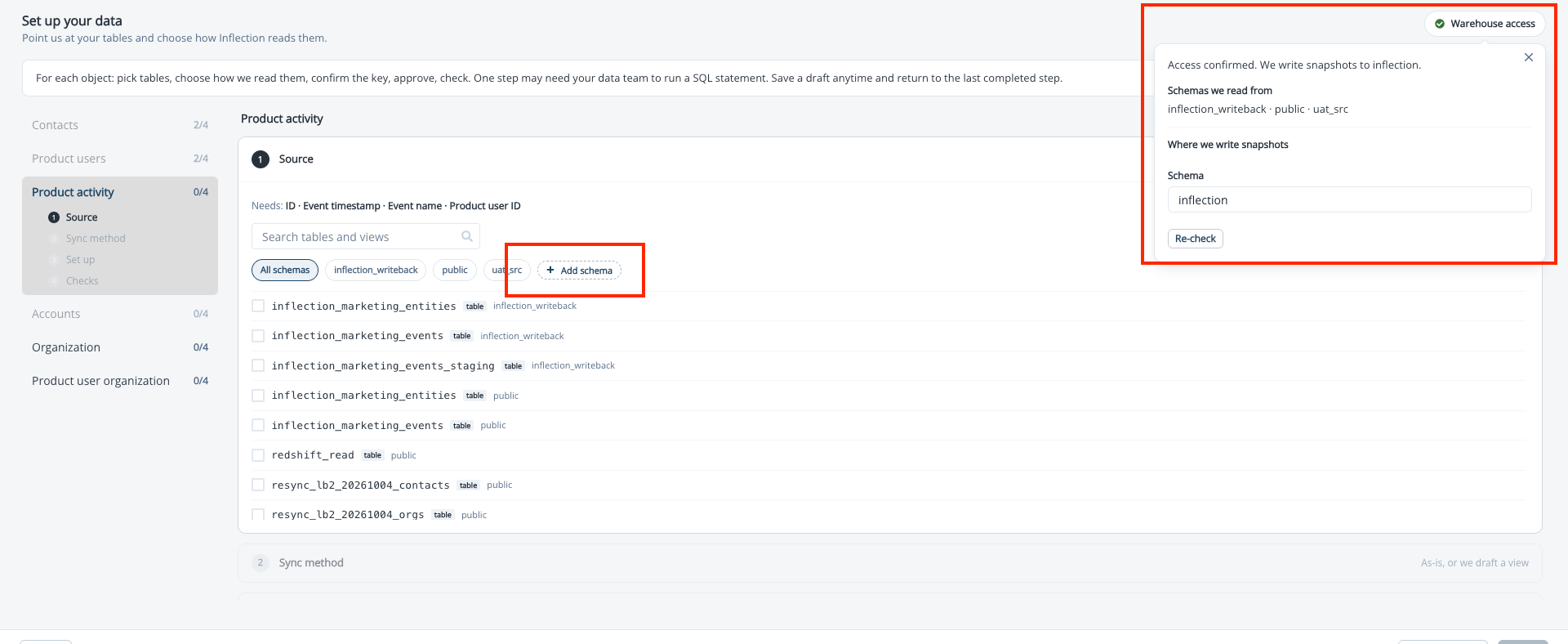
Snowflake: the generated statements grant access to your data. They do not give the Inflection user a default warehouse or role. If the access check passes but Inflection cannot list your tables, follow Give the User a Default Warehouse and Role on the Snowflake Setup page.
Work Through Each Object
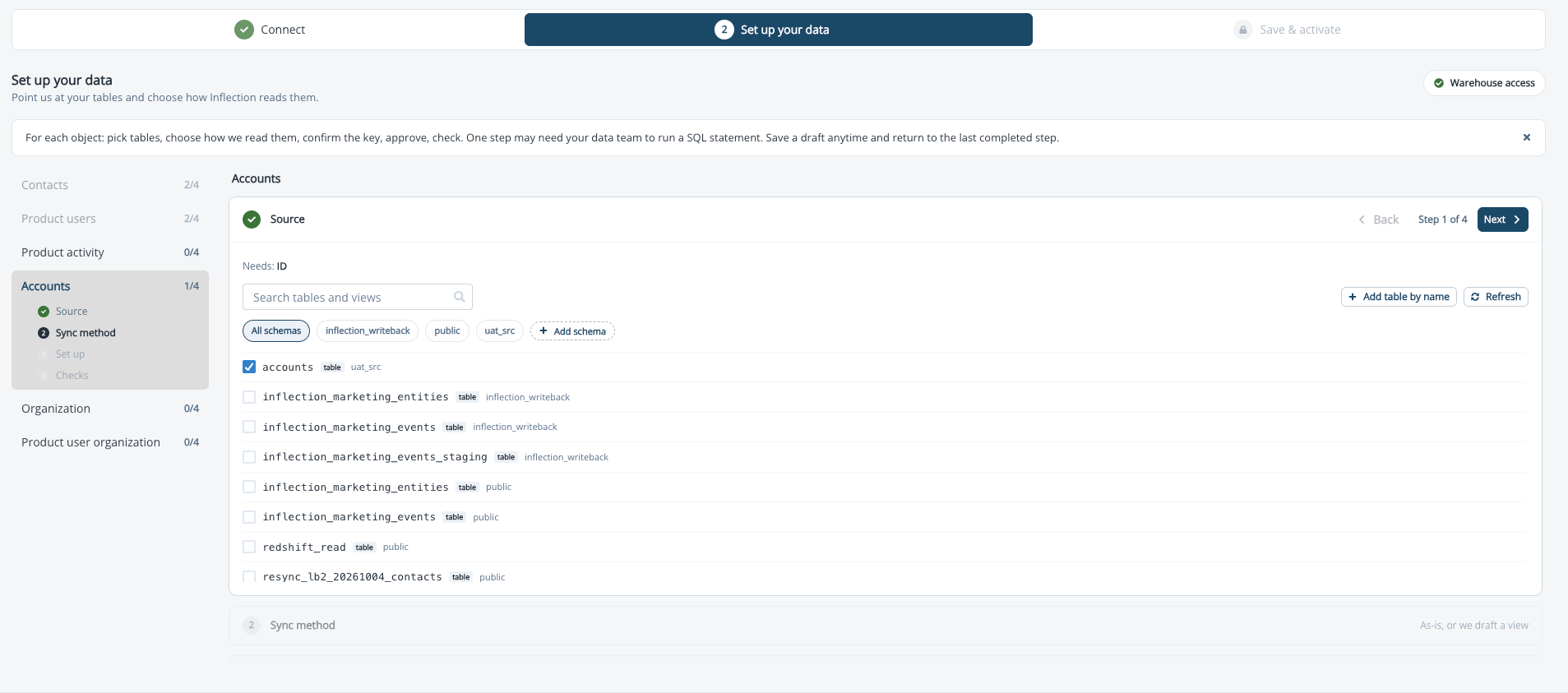
Each object runs the same four stages. All four are always visible. Finished stages collapse to a one-line summary, the current stage is expanded, and later stages are locked until you reach them. The left rail lists your objects with their progress.-
Source. Pick the tables Inflection reads. The list shows every readable schema at once, with each entry labeled as a table or a view, because the names can collide. Use the schema chips to filter. Inflection suggests likely tables for each object; suggestions are optional and never confirm anything on their own. If your user cannot list tables, type the fully qualified name and Inflection verifies it can read it.
-
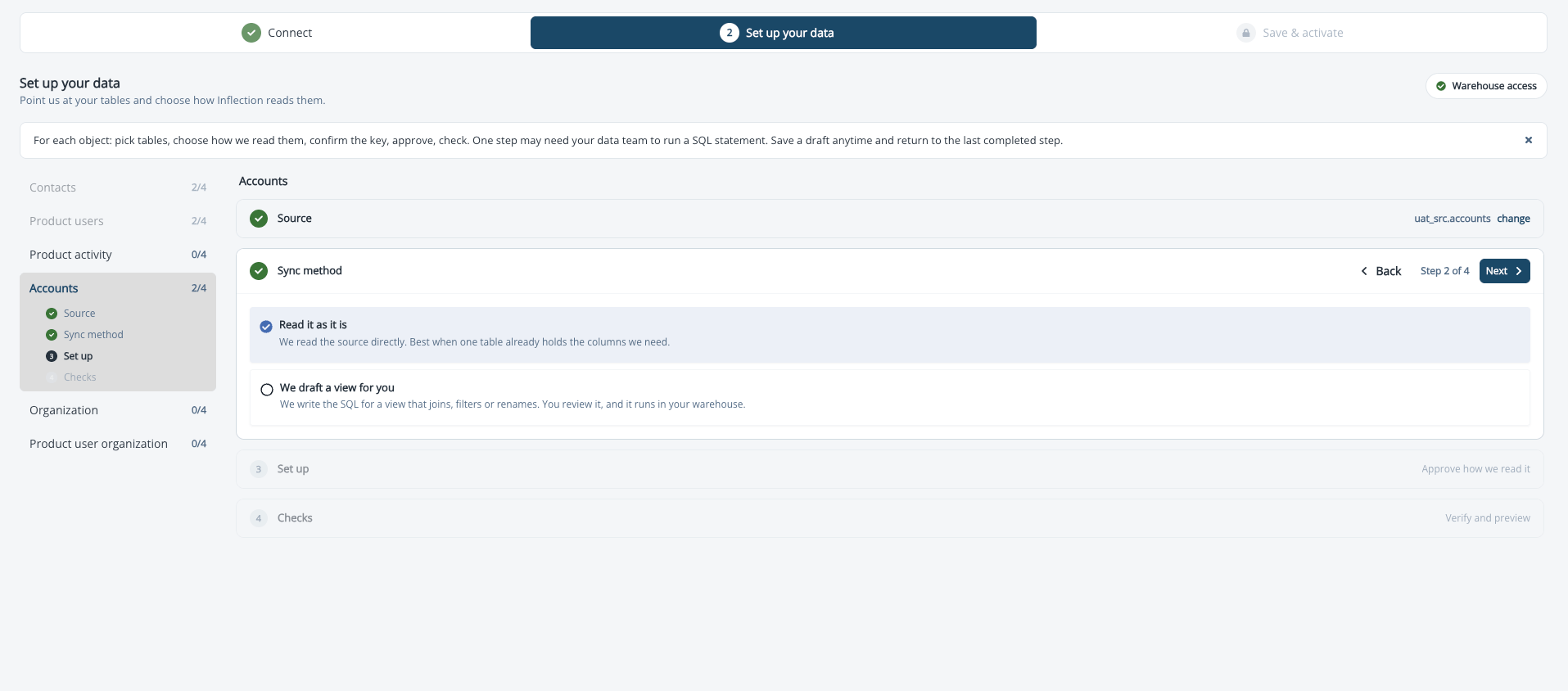
Sync method. Choose how Inflection reads the source. See Choose a Sync Method.
-
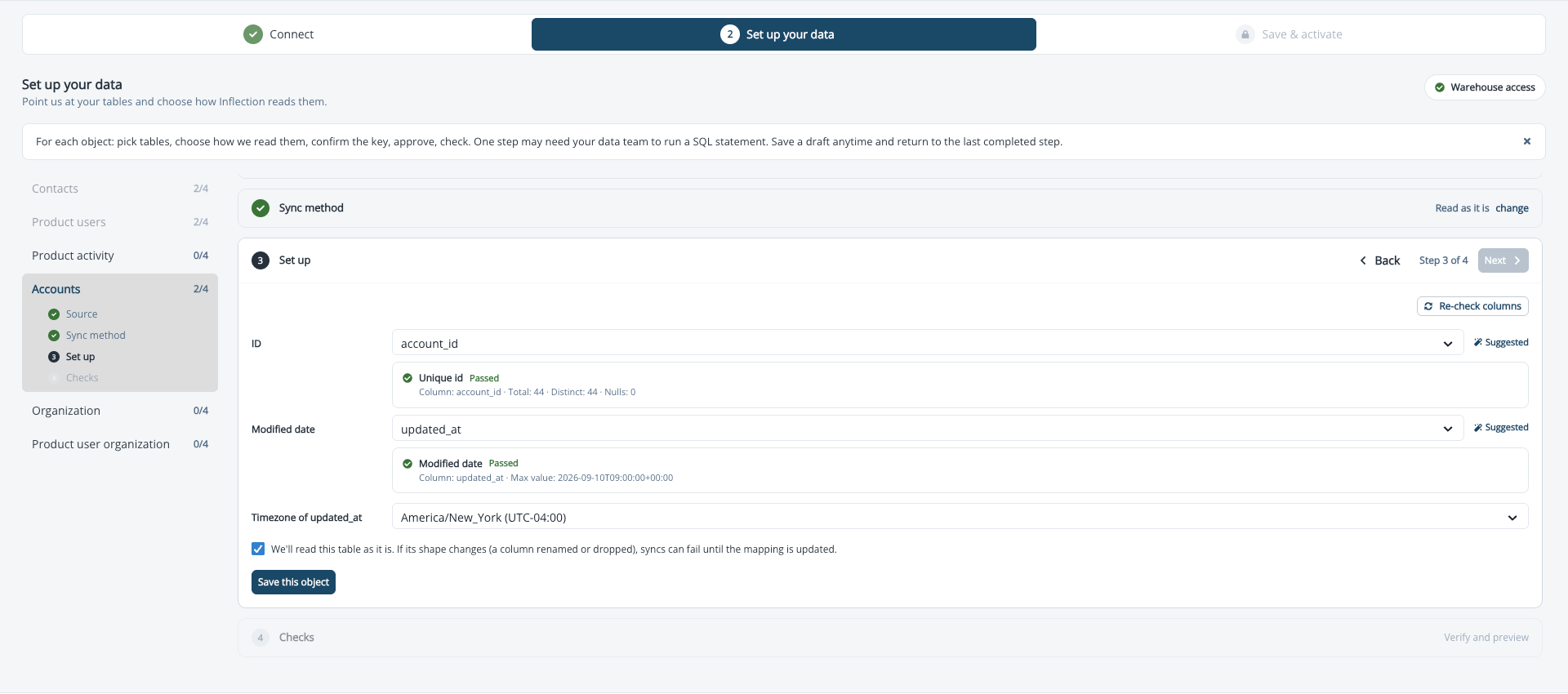
Set up. Inflection probes the table’s metadata and a sample of rows to detect the identity columns, then shows each one as a card: the ID, the Email where the object has one, and the Modified date or Event timestamp. Click Keep this one or Choose another on each. If the timestamp column carries no time zone, a Timezone of picker appears for it. Findings are listed as Worth knowing or Blocks activation. Then approve how Inflection reads the source: for a table read as it is, tick the source agreements and save; for a drafted view, review the SQL and create the view. The stage ends with Agreements accepted or View in place.
-
Checks. Click Run the checks. Inflection validates the final shape and shows a preview of the last 10 records as they will look in Inflection, with the syncing columns highlighted.
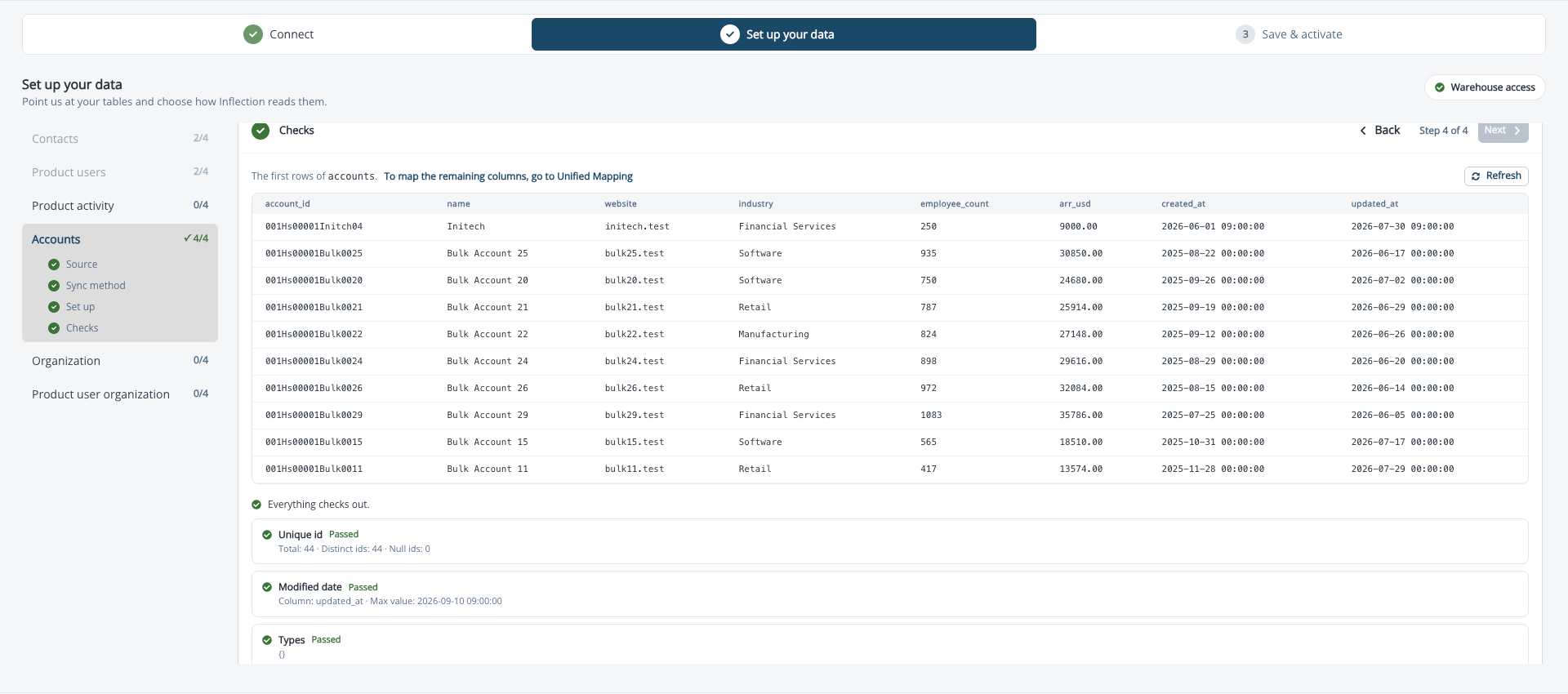
Warnings do not block. Blocking items have to be fixed before you can activate. When everything passes, the stage reads Everything checks out.
Choose a Sync Method
At the Sync method stage you pick one of two options. If you picked more than one table at the Source stage, only the drafted view is available, because a join cannot be read as it is. Read it as it is. Inflection reads the source directly and creates nothing in your warehouse. Best when one table already holds the columns you need. You accept the source agreements, which are the conditions the table has to keep meeting:- The ID stays unique and non-null.
- The modified date updates on every change, in the time zone you declared.
- Mapped columns are not renamed or dropped.
- The Set up stage opens with an empty, editable SQL editor and an AI assist panel. Either write the
SELECTyourself, or click Draft the view and the assistant writes it from the tables you picked, explaining the join and the deduplication it chose, such as keeping the latest row per email by modified date. When several tables are selected it may ask one question first; use Draft, but ask me about the join first if you want to answer that before it drafts, or What will this view need? to see the requirements. - To change the SQL in plain language, describe the change, for example “add a 180-day history window” or “exclude test accounts”, and click Draft the view again. Nothing is saved until you save it.
- Save the draft. Inflection names the view and fixes the first line of the statement; create the view under exactly that name. Every column in the
SELECTother than the identity columns syncs as an attribute. - Click Check the draft to confirm the SQL exposes the identity columns and keeps its deduplication.
- Create the view. Click Copy statement, run it in your warehouse under the name shown, then click Verify it. Inflection confirms the view exists and that it can read it. On Snowflake and Amazon Redshift, where Inflection has write access to the write location, you can instead click Create it for me.
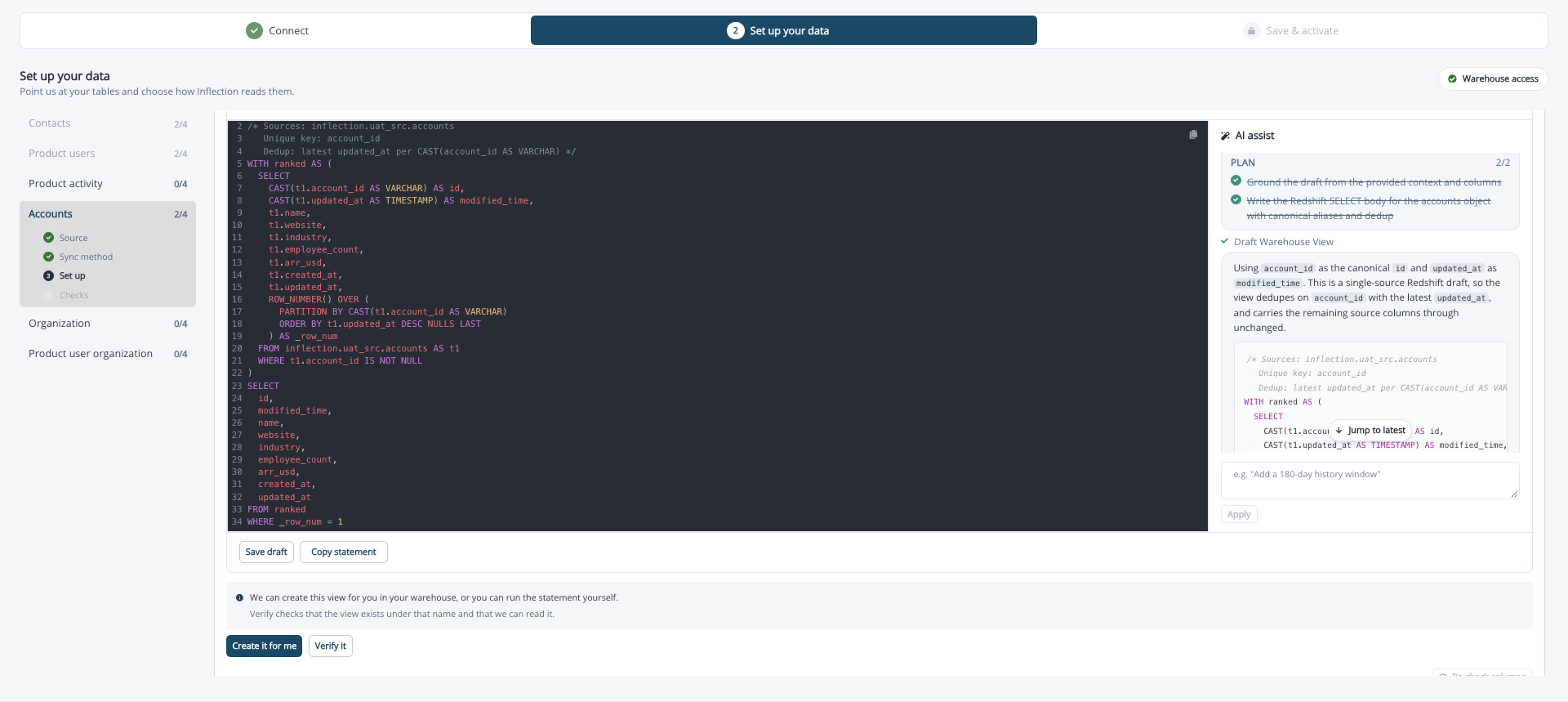
BigQuery and Databricks: Inflection does not create objects in your warehouse, so Create it for me is not offered. Run the statement yourself. On Databricks with a service principal, make sure the service principal has
SELECT on the schema that holds the view. With Delta Sharing, add the view to the share you created for Inflection. It appears as a source you can pick.Step 3: Save and Activate
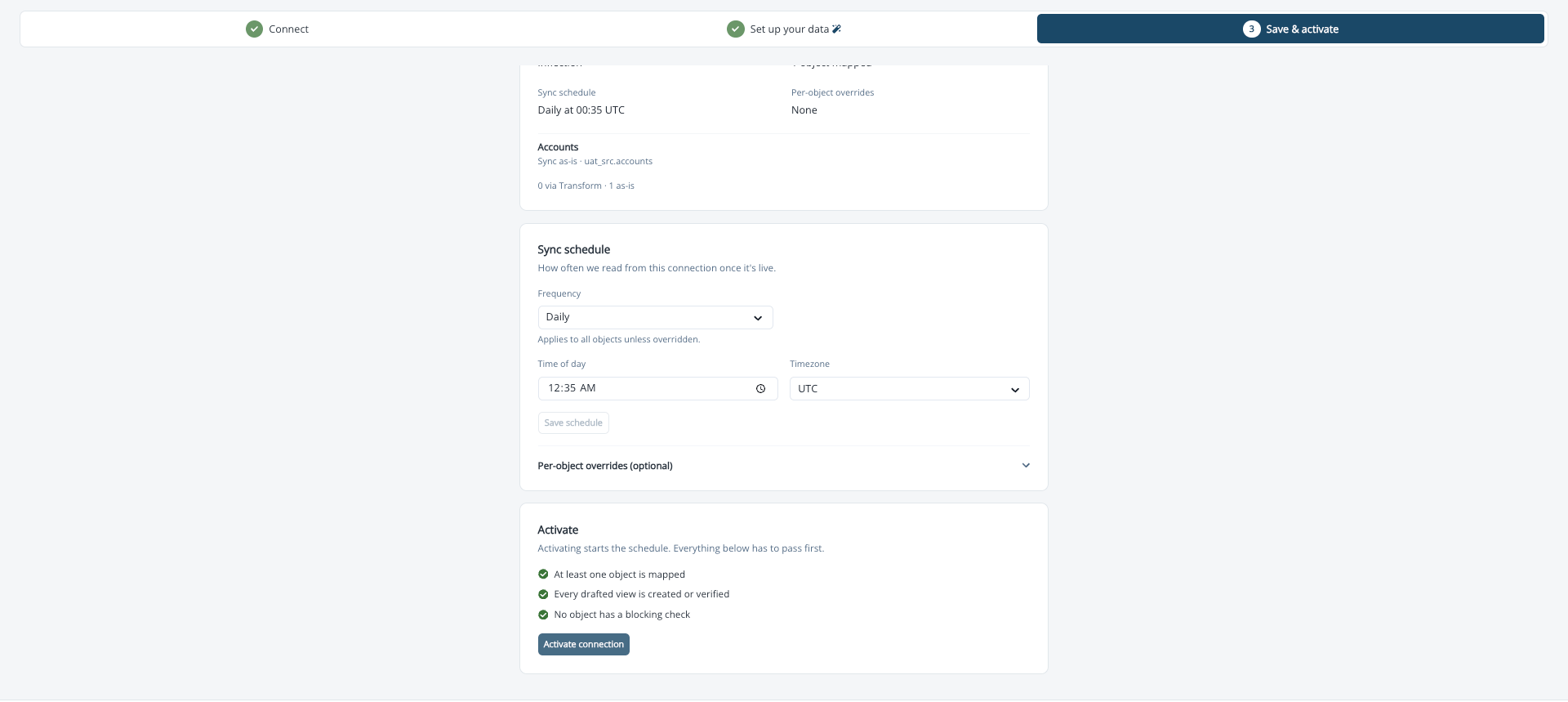
The final step shows a summary of the connection: the warehouse, how many objects are read as they are and how many through a view, which objects passed their checks, and whether every drafted view is in place.- Set the schedule. Choose a Frequency: Every 10 minutes, Every 30 minutes, Hourly, Every 4 hours, Every 12 hours, or Daily. The default is Daily. For Every 12 hours and Daily, also choose a Time of day and a time zone. Shorter frequencies run on a cycle from the moment you activate. Each object can override the connection schedule or follow the connection cadence.
- Snowflake only, for some accounts: if the summary shows Storage setup is needed before activation, open Storage Setup SQL, copy the script, and run it in Snowflake as
ACCOUNTADMIN. Copy theSTORAGE_AWS_IAM_USER_ARNandSTORAGE_AWS_EXTERNAL_IDvalues from the output into the two fields and click Submit aws setup. You can save the draft, run the SQL later, and come back. See Run the Storage Integration SQL on the Snowflake Setup page. - Databricks, service principal connections only: complete the Databricks storage card. Copy the IAM role ARN and create a storage credential in Databricks with it. Paste the credential’s External ID into Inflection and click Save external id. Then run the External location SQL as a metastore admin and click Verify storage. You can save the draft and come back. See Set Up Databricks Storage on the Databricks Setup: Service Principal page.
- Click Activate connection. Activation requires that every drafted view exists, at least one object passed its checks, and no blocking check is failing. On a Databricks service principal connection, the storage must also be verified. There is no separate test sync and no sign-off from Inflection.
- Optionally, run the first sync now instead of waiting for the schedule. Wait up to five minutes after activating before you click Run first sync. Until the schedule registers, the page may show Next sync paused. You can come back to this page later to run it.
Map Your Fields in Unified Mapping
The wizard confirms only the identity columns. Every other column you synced is now a source you can attach to an Inflection field in Unified Mapping. Product activity is different: its identity columns are confirmed in the wizard, and its event properties are read either from a single JSON column or from the property columns you choose to bundle onto each event, rather than mapped as fields. They keep their column names and appear in the product data explorer and audience filters after the first sync. Each warehouse connection appears in Unified Mapping as its own source, so a field can read from Salesforce, Segment, and your warehouse at once. To attach a column to a field, follow Map a Field to a Source. For how conflicts between sources resolve, see Sources and Priority.Changing a mapping in Unified Mapping does not resync the connection. Updating the warehouse mapping does.
After Activation
Connection states, sync history, pausing, credential changes, schedule changes, deleting a connection, and troubleshooting are all covered in Manage and Troubleshoot Data Warehouse Syncs.Setup FAQs
Setting Up
My table has duplicate emails. Will the sync fail?
My table has duplicate emails. Will the sync fail?
No. Duplicate emails are a warning, not a blocker. If you read the table as it is, the most recently updated row per email wins. If Inflection drafts a view for you, you approve a deduplication rule that decides which row survives. Either way, make sure duplicate rows for one person carry the same data, or the surviving row may be the less complete one.
Do I need a separate Contacts table if I sync Product users?
Do I need a separate Contacts table if I sync Product users?
Usually not. Inflection creates a Contact for each new product user that does not already match one by email. The main thing to get right is consistency: if more than one source can create the same user, such as Segment and your warehouse, use the same user ID in both so Inflection resolves them to one person instead of creating duplicates.
Should my company data be an Account or an Organization?
Should my company data be an Account or an Organization?
An Account is the company as your CRM tracks it and maps to your Salesforce Account. An Organization is a workspace or tenant inside your product. Use Organization only when your product actually splits customers into separate workspaces. If your data has a workspace-like ID, check whether it represents several distinct workspaces for one customer or is just an internal identifier for a single customer.
Where should unsubscribe status live?
Where should unsubscribe status live?
On the Contact, and Inflection maintains its own record of it. If you bring unsubscribe data in from your warehouse, plan the flow deliberately. A warehouse field that overwrites the Contact unsubscribe status can silently override an unsubscribe that happened in Inflection. Talk to your Inflection team before go-live if your warehouse is not the system of record for unsubscribes.
How do I move from one product-data source to another?
How do I move from one product-data source to another?
Plan a phased cutover rather than testing the new source against your live setup. Build and validate the new source and its keys in your sandbox workspace first. Then schedule a short maintenance window in production to pause the old sync, update the mappings, and activate the new source. Existing connections are not migrated to a new source automatically.
My data is in several tables. Do I need to build a view myself?
My data is in several tables. Do I need to build a view myself?
No. Pick the tables at the Source stage and choose We draft a view for you. Inflection writes the join for you. This works for every object, including Product activity.
Can I remove one object from a connection?
Can I remove one object from a connection?
Yes. In Set up your data, select the object and click Remove from connection. Inflection stops syncing that object and drops its mapping. The rest of the connection keeps running, and your warehouse tables are not touched. If the object’s fields are still mapped in Unified Mapping, the removal is blocked until you unmap them. See Remove an Object from a Connection.
Not in This Version
Is there an agent that sets up the connection for me?
Is there an agent that sets up the connection for me?
Not end to end. The assistant inside the view editor drafts and edits SQL for you when you choose We draft a view for you. A full setup agent is planned for a later release.
Can one connection read from two databases?
Can one connection read from two databases?
No. Each connection reads from one database. On Snowflake, the write location can be in a different database from the sources. To read from a second database, create a second connection.
Is there a test sync before activation?
Is there a test sync before activation?
No. The checks and preview at the Checks stage validate each object, and the first sync after activation is the real proof. Run it manually from the Save & activate step instead of waiting for the schedule.
Can Inflection connect with read-only access?
Can Inflection connect with read-only access?
On Snowflake and Amazon Redshift, no. Inflection needs write access to the write location for the ID-only snapshot that detects deleted rows. On BigQuery and Databricks, Inflection needs no write access at all.
My setup screen looks different from this page.
My setup screen looks different from this page.
Your workspace is on the earlier connection setup flow. Contact your Inflection customer success team, who can walk you through your setup and let you know when the new flow is available for your workspace.