

-
Get the Inflection Webhook URL
- Obtain the generic webhook endpoint from Inflection.io where data will be ingested
-
Access Webhook Settings
- Log in to Marketo
- Go to Admin → Under Integration, select Webhooks
- Click “New Webhook”.
-
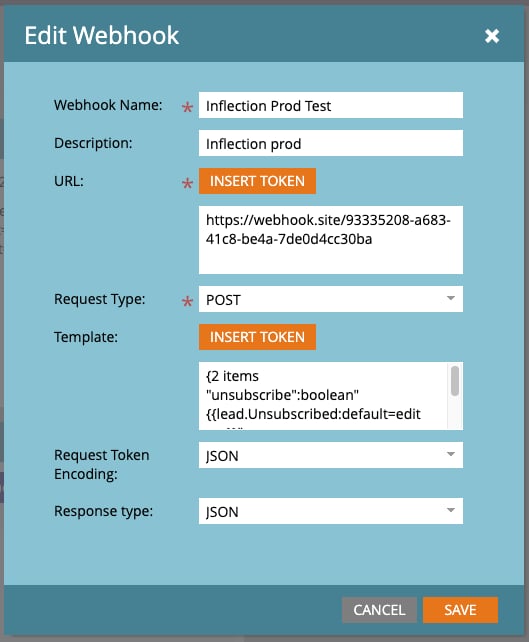
Configure Webhook
- Webhook Name: Give it a descriptive name
- URL: Enter the inflection.io Webhook URL
- Request Type: Select POST
- Headers: Add any required headers
-
Define the JSON payload
Choose response type as JSON
-
Test the Webhook
- Click “Send Test” and verify the response
- Adjust if needed based on requirements
-
Activate Webhook in Smart Campaign
- Navigate to Marketing Activities → Select a Smart Campaign
- Under Flow, click “Call Webhook” and select the newly created webhook
- Activate the campaign
Inbound Webhook Setup Guides
Marketo
Send data from Marketo to Inflection using inbound webhooks.
You can send contact unsubscribe information from Marketo to Inflection.io’s generic webhook endpoint by setting up a Marketo webhook, Here’s how:
Was this page helpful?